

A usable data coverage list must state the exact instruments included, per-symbol start and end dates, bar granularity and timestamp conventions, session and timezone labels, a documented missing-data policy, provenance and version details, and a delivery format that's ready to import. Some vendors build their historical intraday datasets around exactly these fields, so quant traders can check coverage before checkout rather than after a failed import.
TL;DR:
- Vendors should provide detailed instrument coverage, including specific start and end dates, bar resolution, timestamp conventions, and missing-data policies, to avoid survivorship bias.
- A complete coverage list must answer key questions about instrument identifiers, date ranges per symbol, session labels, data fields, provenance, and delivery format to allow proper validation before purchase.
- Quickly checking sample data for schema, timestamp formats, trading session labels, duplicates, and missing bars can reveal critical gaps or inconsistencies that impact backtesting accuracy.
- The importance of verified import-ready formats and matching platform expectations ensures data can be seamlessly integrated into trading systems without silent errors.
- Intraday strategies typically require at least three to five years of high-resolution historical data, with tick data reserved for strategies sensitive to intrabar sequencing or order specifics.
Table of Contents
- What Is a Data Coverage List, and Why Does It Matter for Backtesting?
- Data-Coverage Checklist: Fields Every Vendor List Must Include
- How to Read a Vendor Coverage List in 5 Minutes
- Common Gaps and Gotchas in Coverage Lists
- Delivery, Formats, and Import Readiness
- How Much History and Granularity Do You Actually Need?
- Why Complete Coverage and Import-Ready Bundles Matter More Than Vendors Admit
- Get a Sample Snapshot Before You Commit
- Sources
- FAQ
What Is a Data Coverage List, and Why Does It Matter for Backtesting?
A data coverage list is a specification sheet: it tells you which instruments a historical dataset contains, over what date range, at what bar resolution, and how the vendor delivers it. That's the plain definition, and it's the one this article uses throughout, regardless of how the term gets used elsewhere.
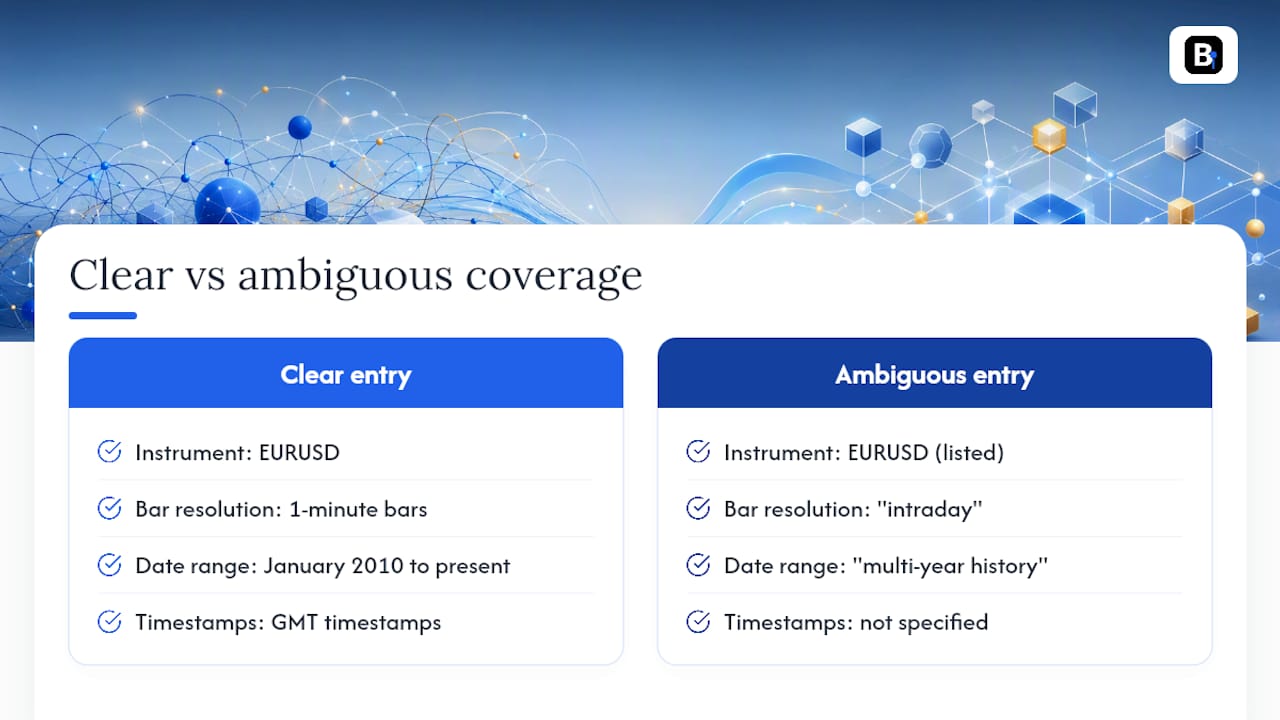
Consider two coverage entries for the same currency pair. A clear one reads: "EURUSD, 1-minute bars, January 2010 to present, GMT timestamps, bid/ask included." An ambiguous one just says "EURUSD, intraday, multi-year history." The second version hides real risk. It doesn't tell you whether delisted symbols or discontinued contracts got dropped from the current universe, which is exactly how survivorship bias creeps into a backtest. A strategy tested only on instruments that still exist today will look better than it should, because everything that failed or got delisted never shows up in the sample.
Coverage errors don't stay abstract. Miss a few overnight sessions in a futures dataset, and your equity curve shows phantom gaps or false continuity, inflating returns that never happened.
Data-Coverage Checklist: Fields Every Vendor List Must Include
Before you commit to a purchase, run the list of instruments and dates against a real checklist. A dataset contract should spell out universe, period, frequency, session labels, identity, price basis, missing-data handling, and provenance clearly enough that you can interpret every row without guessing, according to guidance on pre-purchase data QA.
Here's what a complete coverage entry needs to answer:
- Instrument identifier: a stable key (ticker, ISIN, or exchange symbol) with historical symbol-change mapping, so a renamed or re-listed instrument doesn't silently break your lookups.
- Start and end dates per instrument: not a blanket range for the whole dataset, but a specific window for each symbol, including point-in-time index membership where relevant.
- Bar granularity and timestamp convention: whether timestamps mark bar open or bar close, and what timezone they're in.
- Session and timezone labels: regular session, extended hours, and auction periods flagged separately.
- Data fields: OHLCV at minimum, plus VWAP or trade count if offered, and a clear split between adjusted and raw prices.
- Missingness policy, provenance, and format: how holidays and suspensions are represented, where the data originated, and what file type you'll receive.
A quick reference for what a compliant coverage sheet looks like:
| Field | Example Entry |
|---|---|
| Instrument | EURUSD (ISO code mapped to legacy ticker EUR.USD) |
| Coverage window | January 3, 2010 to current |
| Granularity | 1 minute, bar open timestamp |
| Session labels | Regular session; extended hours in separate file |
| Fields | Open, High, Low, Close, Volume (raw and adjusted) |
| Missingness | Weekends and exchange holidays excluded; no synthetic fill |
| Provenance | Source venue, version, snapshot dated |
| Format | CSV, one file per symbol, ready for MT4/MT5 import |
If a vendor's coverage page can't answer most of these rows for the instruments you care about, that's your answer before you even open a sample file.
How to Read a Vendor Coverage List in 5 Minutes
You don't need a full QA pipeline to catch the obvious problems. A short manual check on a sample file catches most red flags before you spend money.
- Open the sample file and confirm the schema. Check column names, parse the timestamp format, and note whether it marks bar open or bar close.
- Reconcile a few symbols' start and end dates against a known exchange calendar. If a stock's history starts mid-quarter with no explanation, ask why.
- Check timezone and session boundaries. Confirm extended-hours bars are labeled separately from regular-session bars, not blended into one continuous series.
- Scan for duplicates, missing bars, and zero-volume rows. A cluster of zero-volume minutes during active trading hours usually signals a data gap disguised as a quiet period.
- Ask for a provenance note or file hash before you buy, so you can confirm you're getting the exact snapshot you tested.
This mirrors the same discipline recommended for strategy validation more broadly: record the source, freeze the version, and treat every dataset as something you can audit later, not just trust upfront.
Pro Tip: Import the sample directly into the platform you'll actually trade on, MT4, MT5, or NinjaTrader, before buying the full dataset. A file that looks clean in a spreadsheet can still fail silently on import if timestamp formatting doesn't match what the platform expects.
Common Gaps and Gotchas in Coverage Lists
Vendors cut corners in predictable ways, and most of them are easy to test for once you know what to look for.
- Survivorship bias: a coverage list built only from currently active instruments, with no mention of delisted stocks or expired contracts.
- Mislabeled auction rows: closing-auction prints folded into continuous-bar series as if they were regular trades. An auction value and a continuous-market close are not the same thing, and a proper contract should mark session state explicitly.
- Silent price adjustments: splits or dividends applied without a record of which corporate actions triggered the change.
- Futures roll ambiguity: contracts truncated at expiry with no documented roll rule, which can distort intraday fills near contract boundaries.
Backtest validation checklists commonly flag missing corporate-action records and undocumented delisted instruments as the two most common sources of inflated backtest performance. If a vendor's coverage list has no sample rows, no version or snapshot date, and a vague or missing timezone label, treat all three as red flags at once, not isolated quirks.
Delivery, Formats, and Import Readiness
A dataset that's genuinely ready to import looks different from one that just claims to be. Vendors either ship per-symbol CSVs or a single all-in-one bundle, and the zip layout should be documented either way, not something you discover by trial and error.
Look for these signals of real import readiness:
- Consistent column structure across every file, with timestamp format spelled out (ISO 8601 or platform-native).
- Separate files for extended hours rather than blended session data, matching the practice of publishing regular-session and extended-hours files independently.
- A sample ZIP or mapping guide you can test against your platform's import routine before buying the full history.
- Explicit column headers for OHLCV, adjusted vs. raw price, and any auxiliary fields like trade count.
For MT4 and MT5, that means matching the platform's expected CSV structure exactly, a step covered in detail in Backtestmarket's import guide. NinjaTrader users should confirm the vendor's timestamp convention lines up with NinjaTrader's own import wizard before running a full historical load.
How Much History and Granularity Do You Actually Need?
Match granularity to your holding period, not the other way around. A common rule of thumb is sampling at roughly 3 to 5 times finer resolution than your typical trade duration, so a strategy that holds for hours doesn't get modeled on daily bars, according to granularity guidance for algorithmic trading.
As a starting point: intraday strategies typically require several years of history, swing strategies usually benefit from a longer historical period, and very low-frequency strategies need a sufficiently long timeframe to produce statistically meaningful results. Reserve tick data for strategies where intrabar sequencing actually changes the outcome, like stop and target logic, since OHLC bars alone leave the order of price moves inside the bar unknown. Tick files also cost more to store and slower to parse, so weigh that against what your strategy actually needs.
Why Complete Coverage and Import-Ready Bundles Matter More Than Vendors Admit
Most vendors treat coverage disclosure as an afterthought, something you find out after the download link arrives. That's backwards. Some vendors have built minute-bar datasets across forex, metals, bonds, and stock indices since 2014, and the entire value of that history depends on traders being able to check coverage before checkout, not after a failed backtest reveals a gap.
The traders who get burned aren't careless. They're just trusting a coverage claim they never tested against a sample file first.
— Start
Get a Sample Snapshot Before You Commit
Certain datasets map directly onto the checklist covered above: documented instrument coverage since 2014, minute-bar resolution across forex, metals, bonds, and stock indices, and files packaged for direct import into MT4 and MT5 without reformatting.
Some bundles include clean OHLCV data and provenance information, and support may be available if a column or timestamp convention needs clarifying before you buy. If you're building a strategy around a specific asset class, the forex historical data page breaks down instrument coverage and date ranges for that market specifically. Traders on NinjaTrader can check the import guide for NinjaTrader to confirm formatting before purchase. Visit Backtestmarket's data catalog to request a sample snapshot and see the coverage list for the instruments you're testing.
This article is general information, not a substitute for advice from a qualified financial advisor. Consult a qualified financial professional about your own circumstances before acting on anything here.
Sources
- Data QA before Algo Trading backtesting
- Backtesting Validation Checklist: Can You Trust the Results? | ChartMini Blog
- Market Data for Algorithmic Trading: Complete Guide 2026
- Historicaldata
FAQ
What Is a Data Coverage List?
It's a specification document stating which instruments, date ranges, bar resolutions, and file formats a historical dataset includes, letting buyers verify fit before purchase.
Why Does Data Coverage Matter for Backtesting?
Gaps in coverage, like missing delisted instruments or mislabeled sessions, introduce survivorship bias and false returns that make a strategy look better or worse than it really is.
How Do I Check a Vendor's Coverage Claims Quickly?
Open a sample file, verify the schema and timestamp convention, reconcile a few symbols' date ranges against an exchange calendar, and scan for duplicate or zero-volume rows.
Does Backtestmarket Provide Import-Ready Files for MT4 and MT5?
Yes, Backtestmarket packages minute-bar datasets for direct import into MT4 and MT5, with documented columns and formatting covered in its import guide.
How Much Historical Data Do I Need for Intraday Strategies?
Intraday strategies generally need 3 to 5 years of minute-bar history, while swing and low-frequency strategies require a decade or more to produce statistically meaningful results.
Recommended
- Audit First MT5 Backtesting Data: Gap, Timestamp, Ready to Import
- 5 Audits Quants Must Run on Outlier Handled M1 Data Before MT4/MT5
- How to Import CSV Data Into MT4 for Backtesting
- Data Integrity Checks: A Practical Guide to Trustworthy Data
Related resources
Explore BacktestMarket's historical data packs to put the ideas in this article into practice.