

For minute-bar datasets, data delivery speed is the time between requesting a dataset and having it verified and ready on local disk. The fastest path is a one-time bulk download into a local, columnar store, not repeated API calls during backtests. BacktestMarket and providers like LSEG both point to the same fix: batch the request, download once, and read locally forever after.
TL;DR:
- Batch requests for multiple symbols and date ranges rather than requesting data sequentially to drastically reduce download times.
- Schedule large data pulls during off-peak hours and avoid peak market close periods to prevent provider throttling delays.
- Store data locally in formats like Parquet or DuckDB to enable faster access and minimize repetitive network downloads.
- Automate data validation procedures to detect gaps, duplicates, and timestamp inconsistencies before starting backtests, saving troubleshooting time later.
- Use direct cloud storage downloads when supported, and build resumable, segmented transfers to improve transfer reliability and speed over unstable connections.
Table of Contents
- What Actually Slows Down Minute-Bar Data Delivery?
- How Do You Actually Speed Up Data Delivery?
- Should You Store the Full Dataset Locally?
- Do You Need to Validate Data Before Backtesting?
- Why Pre-Validated, Ready-to-Import Datasets Change the Delivery Equation
- Your Pre-Run Checklist Before Ordering Data
- Get Data Delivery Speed Right From the First Download
- Sources
- FAQ
What Actually Slows Down Minute-Bar Data Delivery?
Three forces control how fast a dataset lands on your machine, and most traders only fight one of them.
Bandwidth is the obvious ceiling, but it's rarely the real bottleneck for minute-bar files. A year of one-minute forex bars for a single pair might run a few hundred megabytes; a symmetric 100 Mbps connection eats that in seconds. The bottleneck usually sits upstream, on the provider's side.
Server-side load spikes hit hardest right at market close, when everyone requests the same day's data at once. Providers throttle concurrent extractions per report template to keep response times stable for everyone, which means your job queues behind other people's jobs during exactly the window you want data fastest.
API rate limits compound this. Pulling data one symbol at a time, one request per second, turns a 100 symbol download into a job lasting well over 100 seconds that gets bulk-batched to under a second with unlimited or bulk access. Synchronous API calls often time out around half a minute, so any request that takes longer may fail and require a retry.
The worst pattern by far: fetching historical bars live, mid-backtest, instead of beforehand. It's slow, it's non-deterministic, and it turns a research question into a networking problem. Common failure points include:
- Per-symbol sequential API calls instead of batch/bulk endpoints
- Requests fired during peak provider load (market close, month-end)
- Synchronous calls that exceed timeout windows on large date ranges
- No local cache, so every backtest re-triggers the same download
How Do You Actually Speed Up Data Delivery?
Fixing delivery speed is mostly about changing when and how you ask for data, not upgrading your internet connection.
- Batch, don't loop. Request symbols and date ranges in bulk rather than looping one call per symbol. This alone is the single biggest lever available, cutting a hundred-plus-second job to under a second in provider benchmarks.
- Schedule off-peak. Run large pulls outside market-close windows and stagger concurrent jobs so you're not competing with your own requests for the same queue slot.
- Go async for long jobs. Use asynchronous extraction endpoints that return a location URL you poll later, instead of a synchronous call that dies at the 30-second mark.
- Download direct from cloud storage. Where a provider supports direct S3 downloads, use it. That bypasses the API server entirely and routes the transfer through infrastructure built for throughput, not query logic.
- Build in resumability. Segmented, resumable downloads with controlled concurrency and exponential backoff on retries keep a dropped connection from forcing a full restart.
Pro Tip: Track three numbers every time you pull data: time-to-first-byte, sustained throughput in megabytes per second, and total wall-clock time to a verified local file. If time-to-first-byte is high but throughput is fine once it starts, the problem is queuing, not bandwidth, and no amount of connection upgrades will fix it.
Should You Store the Full Dataset Locally?
Yes, and it's the single biggest architectural decision affecting delivery speed. Fetch once, store locally, read many times. That pattern turns a network problem into a disk-read problem, and disk reads are measured in milliseconds, not minutes.
Format choice matters more than most traders assume. CSV is portable but slow to parse at scale. Columnar formats change the math entirely:
- Parquet compresses well and lets you read only the columns and date ranges you need, which matters when a multi-year minute-bar file across dozens of instruments would otherwise choke a naive loader.
- Feather trades some compression for near-instant read speed, useful for iterative research where you reload the same file dozens of times a day.
- DuckDB lets you run SQL-style queries directly against Parquet files, often an order of magnitude faster than scanning raw CSV for multi-symbol backtests.
Layout discipline pays off later. Organize by instrument and year, keep a manifest of what's been validated and when, and version your local store the same way you'd version code. Rather than re-downloading everything monthly, append only the new delta and compact files periodically to avoid thousands of tiny fragments.
For MT4 and MT5 import, keep your local store in the exact bar format the platform expects before you convert. A pre-formatted, ready-to-import file avoids a second conversion pass every time you refresh data. If you're new to that conversion step, our guide to importing historical data in MetaTrader walks through the mapping.
Do You Need to Validate Data Before Backtesting?
Always, and it takes minutes, not hours, if you automate it. A fast download that's full of gaps or duplicates wastes more time than a slow one, because you don't find out until the backtest results look wrong.
- Dedupe on a composite key. Enforce a unique key on symbol plus minute timestamp, both at the application layer and as a storage-level index, so duplicate bars from retried requests never silently double-count.
- Detect gaps against the exchange calendar. Compare expected minute counts to actual stored records for each trading session, then classify gaps as holidays, halts, or genuine missing data.
- Align timestamp convention. Confirm whether each bar is timestamped at the start or end of the minute, and normalize it once across your entire store, since mismatched conventions quietly shift every backtest signal.
- Repair what's missing. Use targeted re-pulls for short gaps, real-time tick backups to reconstruct recent holes, or bar synthesis when a provider can't refill history.
- Automate the scan. Run a daily audit job that flags anomalies before you ever touch the data in a backtest, not after a strategy produces suspicious returns.
Our audit checklist for MT5 backtesting data covers this workflow in more detail if you want a repeatable process.
Why Pre-Validated, Ready-to-Import Datasets Change the Delivery Equation
A dataset that's already clean and formatted removes most of the delivery-speed problem before it starts. Some providers offer minute-bar historical intraday data across various asset classes, delivered as a single all-in-one download ready for direct import into MT4 and MT5.
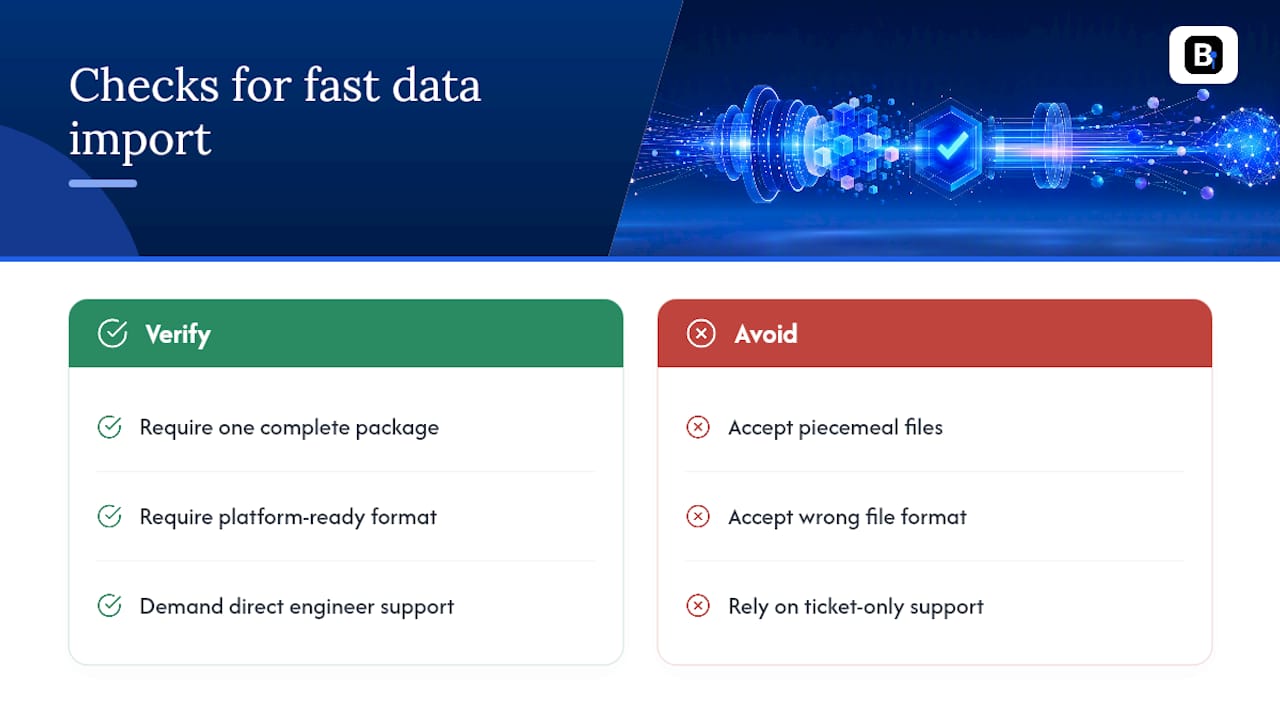
When you're evaluating any vendor's data, verify three things: does it arrive as one complete package instead of piecemeal files, is it already in the format your platform expects, and can you reach a real engineer, not a ticket queue, if ingestion breaks. Good support comes directly from engineers who collect and validate the data, which shortens troubleshooting greatly. That combination is what separates a dataset you can import versus one that just downloaded.
Your Pre-Run Checklist Before Ordering Data
Download and verify the complete dataset before writing a single line of strategy code. Warm the local cache with a quick benchmark read to confirm access speed. Automate incremental updates for off-peak hours, and log every transfer time and retry failure. Twenty minutes of setup here saves days of debugging a backtest that was never the problem.
— Start
Get Data Delivery Speed Right From the First Download
BacktestMarket exists because pulling data live during a backtest is the wrong pattern, and most delivery-speed problems traders fight are really data-sourcing problems in disguise. Instead of stitching together API calls against rate limits and timeout windows, you get one clean, ready-to-import download across forex, metals, bonds, and stock indices, formatted for MT4 and MT5 from the start.
If you need recurring access across asset classes, the Annual Plan covers ongoing dataset updates and direct engineer support for €119 per year. If you just need one dataset now, go straight to Historical Data and pull a sample file to confirm the format matches your platform before committing to a full backtest run. If ingestion throws an error, the engineers who built the pipeline are the ones who answer, not a support script.
Sources
LSEG's tick history download guide covers batching and async patterns in depth. The DataScope Select fair usage policy details S3 direct-download setup.
- How optimize tick history file downloads (LSEG Developers)
- How to detect and fix problems in intraday market data — Concretum Group
FAQ
What Is a Good Time-to-Availability Benchmark for Minute-Bar Data?
There's no universal number since it depends on file size and provider, but the goal is a single verified local file, not a live feed you re-query. Track your own time-to-first-byte and total transfer time each pull so you have a baseline to catch regressions.
Does Batching Requests Really Make That Much Difference?
Yes. Provider benchmarks show batched or bulk access can cut download time from over 100 seconds to under 1 second for the same 100-symbol job that would otherwise run one request per second.
Why Does My API Call Keep Timing Out on Large Date Ranges?
Synchronous API calls typically fail around the 30-second mark, so a request spanning a large history window often exceeds that window before the server responds. Switching to an asynchronous endpoint that returns a location URL for later polling avoids the timeout entirely.
What Format Should I Store Minute-Bar Data in Locally?
Columnar formats like Parquet, or an embedded engine like DuckDB reading Parquet files, are typically far faster for multi-symbol reads than raw CSV. Both compress well and let you query only the columns and date ranges a given backtest actually needs.
Recommended
- Minute Bar Data: What Quants Need for Reliable Backtests
- How to Achieve 99% Modeling Quality in MT4 for Backtests
- Holiday Gaps in Market Data: A Quant's Handling Guide
- 5 Audits Quants Must Run on Outlier Handled M1 Data Before MT4/MT5
Related resources
Explore BacktestMarket's historical data packs to put the ideas in this article into practice.