

Real tick archives, converted for MT4 and run under "every tick" modeling, produce the most trustworthy backtests. So do professionally cleaned minute-bar bundles built specifically for import. Anything else, including raw broker history alone, tends to hide gaps that inflate your results. Before you touch a strategy file, open your History Center and check its modeling quality, or pull a small sample tick file and eyeball it for holes.
TL;DR:
- Using high-quality tick archives or professionally cleaned minute-bar bundles ensures the most accurate backtest results, while raw broker data often contains gaps that inflate performance estimates.
- MT4 relies on one-minute data to generate higher timeframes, so gaps in M1 history directly affect all derived candles and cannot be hidden from the user.
- Importing data requires matching symbol names exactly and applying correct timezone adjustments; failing to do so causes misaligned timestamps and inaccurate results.
- A model's high percentage score does not guarantee data correctness; it is essential to verify gap detection, timestamp continuity, spread behavior, and event reactions.
- For short-term strategies, only real tick data in "Every tick" mode provides the intra-bar detail necessary to accurately simulate slippage and spikes.
Table of Contents
- How MT4 Stores and Imports Historical Data
- Checking Whether Your Data Is Actually Good
- Matching the Right Data Source to Your Strategy
- From Raw Archive to Working MT4 Backtest: The Workflow
- How BacktestMarket Removes the Friction From MT4 Data
- What Most Guides Get Wrong About Backtesting Data
- Get MT4-Ready Data Without the Cleanup Work
- Sources
How MT4 Stores and Imports Historical Data
MT4 keeps history in a place most traders never open until something breaks: the History Center. You get there through Tools → History Center, or the F2 shortcut, and it's worth learning your way around before you need it in a hurry.
Here's the mechanic that surprises newer developers: MT4 only really needs M1 (one-minute) data downloaded directly. Every other timeframe, M5, H1, H4, daily, gets recalculated from that M1 base. The History Center documentation confirms this directly. If your M1 data has holes, every higher timeframe built from it inherits those same holes, invisibly.
MT4 accepts history in a couple of formats: its native HST binary format, and CSV for import/export. When you're importing CSV, four settings decide whether the import actually works:
- Separator — comma, semicolon, or tab, matching whatever your source file uses.
- Skip lines — how many header rows to ignore before real data starts.
- Time shift — the offset in hours needed to align your source's timezone with your broker's server time.
- Volumes — whether tick or real volume columns are included, and whether MT4 should read them.
To actually replace a symbol's history: open History Center, pick the symbol and timeframe, delete the existing corrupted range if needed, then import your prepared CSV. MT4 requires the symbol name in your file to match the symbol name in your Market Watch exactly, including any broker-specific suffixes like ".raw" or "m". Miss that and the import silently fails or attaches to the wrong instrument.
GMT offset mismatches are the single most common import failure. Your data source states its own timezone; your broker runs on its own server time, which is rarely UTC. If you don't apply the correct time shift during import, every candle lands an hour or more off, and your backtest timestamps stop lining up with real market events like news releases or session opens.
Pro Tip: Before importing a full dataset, import just one week of data first and manually check three or four known price levels against a second source. It takes five minutes and catches timezone errors before they contaminate months of history.
For a full walkthrough with the exact dialog boxes and menu paths, BacktestMarket's guide to importing historical data in MetaTrader covers the process step by step, and the CSV import guide breaks down file prep in more detail.
Checking Whether Your Data Is Actually Good
Modeling quality is the number MT4 shows you after a Strategy Tester run, and it's also the number most traders misread. A high percentage feels like a green light. It isn't automatically one.
Here's what that percentage hides: it measures how well MT4 reconstructed tick-level movement from the data you fed it, not whether the underlying data itself is correct. Feed MT4 a clean but wrong dataset (say, one with a systematic timezone shift) and you can still see a high modeling quality score while every trade timestamp is off by an hour. The score checks internal consistency, not ground truth.
So what should you actually check, beyond the percentage?
- Gap detection: scan for missing candles, especially around weekends, low-liquidity holidays, or broker maintenance windows.
- Timestamp continuity: confirm your bars run in unbroken sequence with no duplicate or out-of-order entries.
- Spread and bid/ask verification: compare your dataset's spread behavior against a known live feed for the same period, particularly around news events.
- Live-versus-archive spot checks: pull a handful of price points from your history and compare them against a second independent source or live chart.
- Event-based sanity checks: look at price action around a major, well-documented news release; if your data shows no reaction, something's missing.
Testing logs matter more than the summary score. When you run "Every tick" mode with an imported tick archive and check the diagnostics, the logs reveal gaps and interpolation artifacts the top-line percentage won't flag on its own.
Data quality snapshot: Gaps in broker or server-side history frequently cluster around specific causes, and pattern analysis in testing logs can distinguish weekend and exchange-closure gaps from news-event dropouts or straight broker-delivery failures. Knowing which one you're looking at determines whether you patch it, replace the whole range, or just accept it as a known limitation.
If you're auditing a dataset before committing hours to a backtest, a structured checklist like BacktestMarket's audit framework walks through gap, timestamp, and readiness checks that apply just as well to MT4 as to MT5.
Matching the Right Data Source to Your Strategy
Not every strategy needs the same fidelity, and buying more precision than you need just wastes money and setup time.
A swing strategy holding trades for days barely notices whether its backtest ran on tick data or clean M1 bars. A scalping strategy or anything sensitive to slippage absolutely does. Open-price-only or synthesized ticks built from minute bars miss the intra-bar action entirely, and practitioner guidance is consistent that final validation for short-term strategies needs real tick data run under "Every tick" mode.
Before you commit to a vendor or archive, run through this checklist:
- Fidelity match: tick data for scalping and slippage-sensitive systems; clean M1 bundles are fine for swing or position strategies.
- History depth: confirm the vendor covers enough years for your strategy's sample size, particularly across different volatility regimes.
- Coverage sample check: request or download a sample file and manually inspect it before buying a full multi-year bundle.
- Import readiness: ready-to-import MT4 bundles save real setup time versus raw archives that need conversion and timezone correction yourself.
- Support quality: check whether the vendor offers direct technical help when an import fails, not just a static FAQ page.
- Licensing and pricing: understand whether you're buying a one-time dataset or a recurring subscription, and what usage restrictions apply.
Pro Tip: Always request a sample dataset for one symbol and one month before buying a full multi-instrument bundle. A five-minute inspection of the sample tells you more about a vendor's cleaning standards than any marketing page will.
Back-adjusted, corporate-action-aware bundles matter more than most traders expect, especially for anyone testing across a whole portfolio rather than one symbol at a time, since inconsistent adjustments between instruments quietly distort correlation-based strategies.
From Raw Archive to Working MT4 Backtest: The Workflow
Here's the practical path most developers follow to go from a raw tick archive to a working "Every tick" backtest:
- Download the raw tick archive for your target symbol and date range (Dukascopy's public archive is the most commonly used free source).
- Convert the raw ticks into MT4-compatible format using either a dedicated converter, an automation script built for this exact purpose, or a commercial tool.
- Import the converted file through History Center, applying the correct GMT offset and matching symbol names exactly.
- Verify by running a Strategy Tester pass on "Every tick" mode and checking the modeling quality diagnostics and logs for gaps.
Which tool you reach for depends on how often you're doing this. Tick Data Suite integrates directly with MT4's Strategy Tester, letting you use tick datasets without manual file shuffling every time you re-test. Tickstory handles similar territory for traders who want a dedicated download-and-convert utility rather than a full integration layer. Manual scripts win when you're managing dozens of symbols and need repeatable, unattended conversion.
Run this checklist before every serious backtest, regardless of which path you took:
- GMT offset confirmed against your broker's server time.
- Symbol naming matches Market Watch exactly, suffixes included.
- Modeling quality checked, and logs reviewed, not just the summary percentage.
If you're running multiple MT4 terminals to replicate trades across accounts once your data and strategy are validated, a trade copier setup handles the account replication side without touching your historical data pipeline.
How BacktestMarket Removes the Friction From MT4 Data
Most of the problems above, timezone mismatches, symbol name mismatches, unexplained gaps around rollovers, are exactly what BacktestMarket's minute-bar datasets are built to avoid. Every bundle ships pre-cleaned and formatted for direct import into MT4, covering forex, metals, indices, bonds, and commodities, so you skip the conversion step entirely.
Clients get support directly from the engineers who build the datasets, not a generic help desk, which matters when an import behaves unexpectedly at 11 PM before a strategy deadline. The practical next step is straightforward: pull a sample dataset for one instrument, run it through the MT4 import walkthrough, and check the resulting modeling quality yourself before deciding on a full bundle.
What Most Guides Get Wrong About Backtesting Data
Most advice on this topic treats data sourcing as a one-time decision: pick a vendor, download once, move on. That's backwards. The datasets that actually hold up are the ones traders re-verify every time they add a strategy variant or extend a date range, because a gap that didn't matter for one system can quietly wreck another.
The overrated fix is chasing a higher modeling quality percentage as if it's a pass/fail grade. It's a diagnostic, not a verdict.
What should come first, before source selection or conversion tools: decide what your strategy is actually sensitive to. A scalping system and a weekly swing system have almost nothing in common in terms of data requirements, and buying tick-level precision for a strategy that doesn't need it just adds setup time for no real benefit.
— Start
Get MT4-Ready Data Without the Cleanup Work
Backtestmarket sells the very thing this entire guide just described building by hand: clean, minute-bar historical data across forex, metals, indices, bonds, and commodities, packaged for immediate import into MT4 and MT5, no conversion scripts or timezone guesswork required.
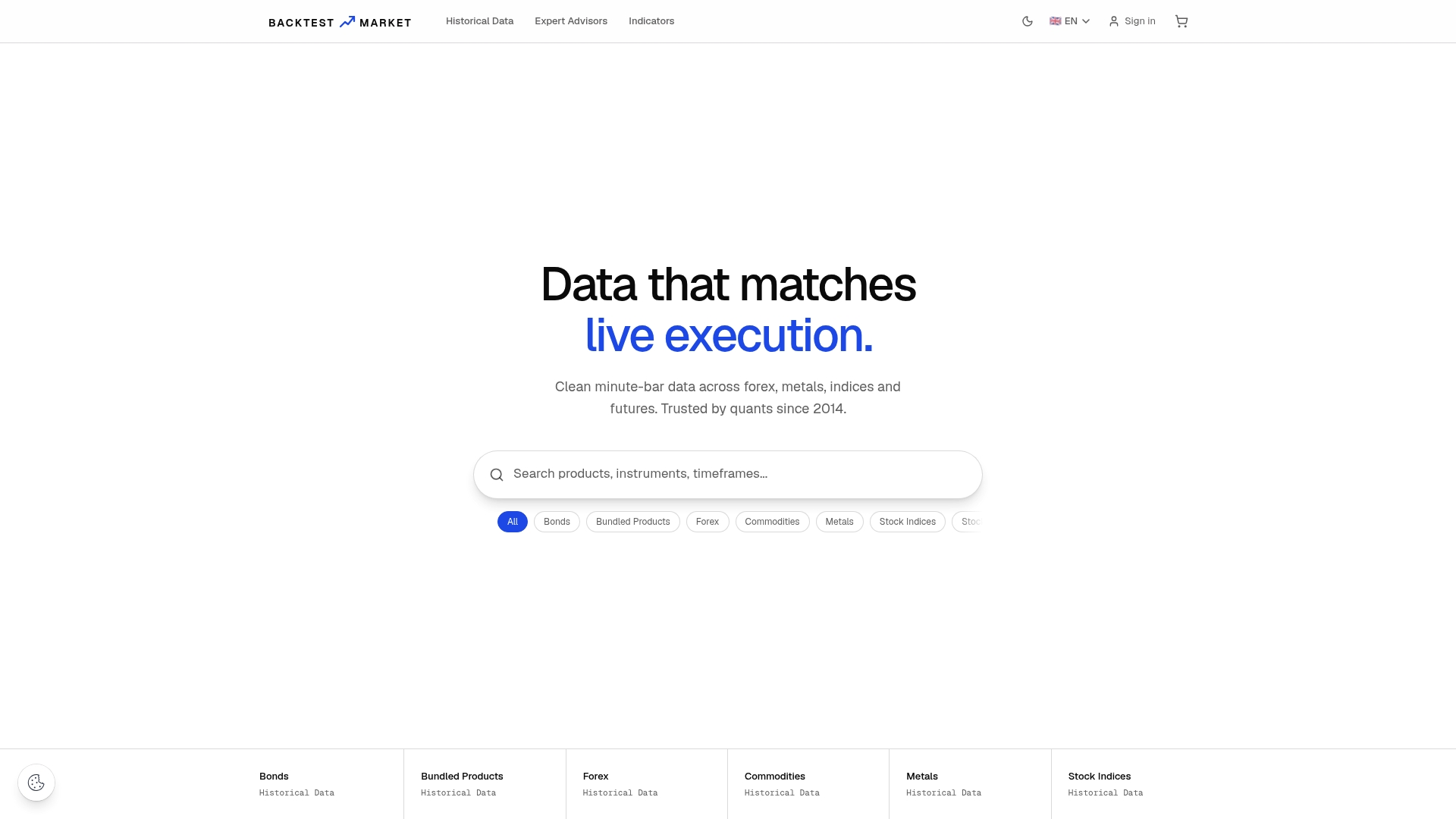
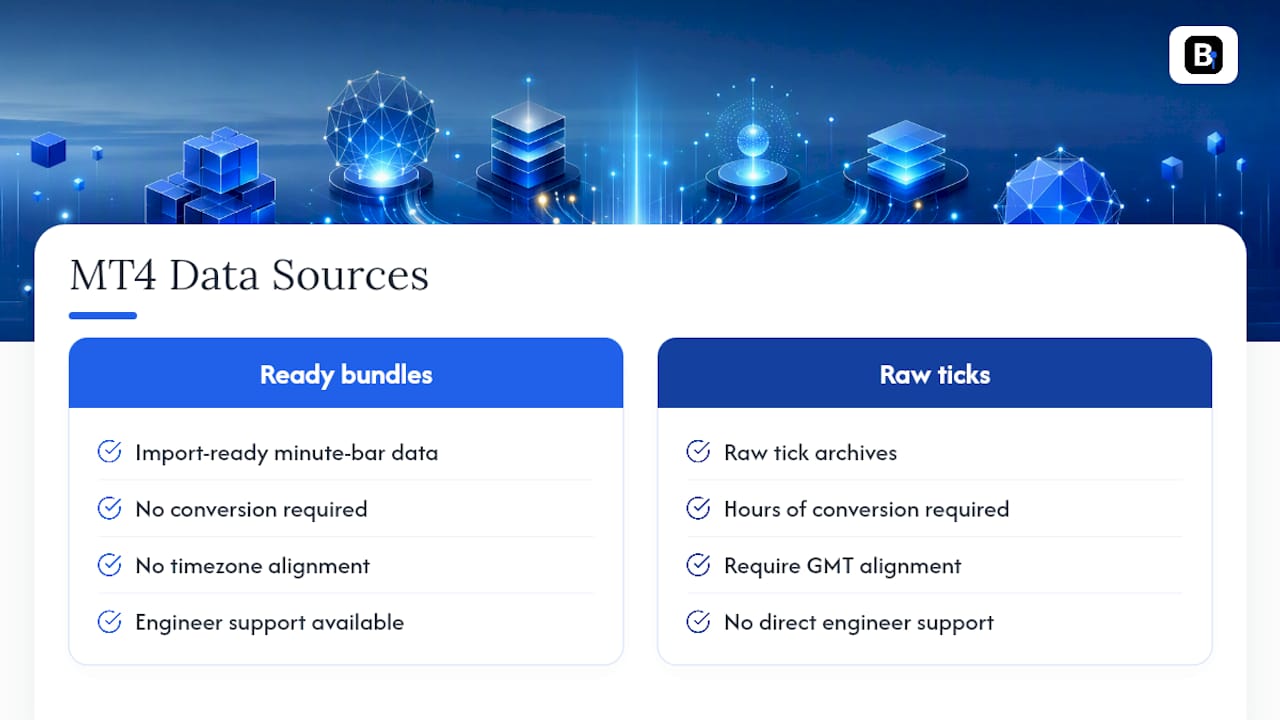
Where a raw tick archive demands hours of conversion and GMT alignment before you can trust a single backtest, Backtestmarket's bundles arrive ready to drop straight into History Center. That difference matters most if you're testing across multiple instruments at once, since building your own conversion pipeline for each symbol adds up fast in hours you're not spending on the actual strategy. Clients get support directly from the engineers behind the datasets, useful when an import stalls and you need a real answer, not a ticket queue.
Browse the historical data catalog to see coverage by asset class, or head straight to the product page to download a dataset and start validating your next strategy today.
Sources
Every trader eventually splits into one of four camps, and each comes with its own trade-off between accuracy, cost, and how much time you'll burn cleaning files.
Broker-supplied history is the default. It's free, it's already sitting in your terminal, and it's often the weakest link in the chain. Brokers store what their servers happened to capture, and that can mean missing weekends, thin liquidity windows, or entire months with no coverage. Broker-provided data via MT4 can be incomplete enough that developers routinely swap it out for something cleaner before trusting a single backtest number.
Public tick archives sit a level up. Dukascopy's free tick archive is the one developers cite most often as a canonical raw source, and for good reason: it's granular, it's free, and converting it for MT4 reaches very high modeling quality once it's processed correctly. The catch is the processing. Raw tick dumps need conversion, timezone alignment, and validation before MT4 will accept them cleanly, and that step trips up a lot of people on their first attempt.
Commercial vendors trade money for time. A ready-to-import bundle, built and cleaned in advance, skips the conversion headache entirely. You're paying for someone else's cleanup work, not for data that doesn't otherwise exist. For anyone running multiple instruments or asset classes, that time savings compounds fast, since you're not rebuilding the same conversion pipeline for every symbol.
Replay platforms and integrated tools handle a different problem: matching execution behavior, not just price history. This is where tools like Tick Data Suite come in, letting you use downloaded tick datasets without manually shuffling files in and out of the History Center.
A quick way to sort these by what actually matters:
- MetaTrader 4 — History Center (Help)
- Importing High Quality Tick Data on MetaTrader 4 & 5 — Algorush
- Script To Download Historical Data From MetaTrader4 — GitHub
Why do developers gravitate toward tick archives instead of just using minute bars? Because minute bars smooth over what happens inside each candle. A strategy that fires on intra-bar spikes, or one sensitive to slippage, will backtest fine on M1 data and then fall apart live. Tick-level detail catches what open-only bars miss.
Recommended
- Fixing MT4 Missing Data: A Complete Recovery Guide
- How to Import CSV Data Into MT4 for Backtesting
- How to Achieve 99% Modeling Quality in MT4 for Backtests
- How to Fix the MT4 GMT Offset for Accurate EA Timing
Related resources
Explore BacktestMarket's historical data packs to put the ideas in this article into practice.