

For MT4, compute (TimeCurrent() - TimeGMT()) / 3600 to get your broker's GMT offset. For MT5, read SymbolInfoInteger(Symbol(), SYMBOL_GMT_SHIFT) directly. Those two lines settle 90 percent of the "why is my EA trading at the wrong hour" tickets that flood MQL forums every DST transition.
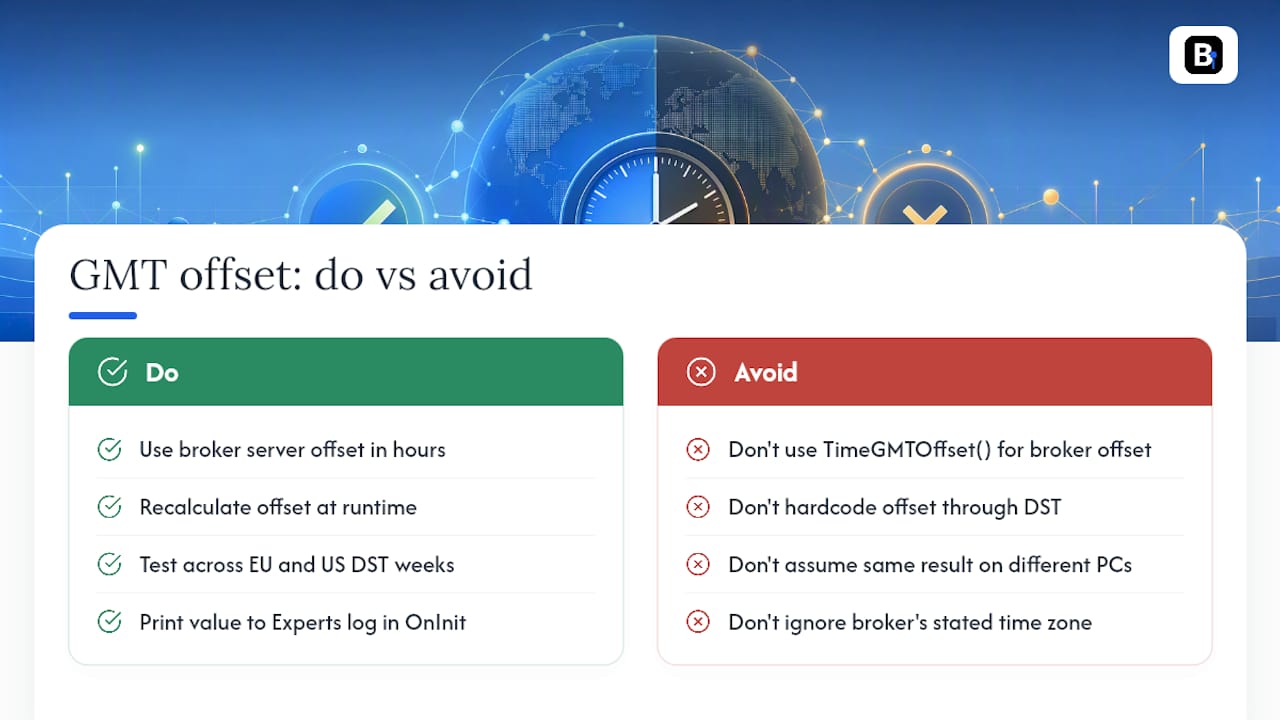
Don't reach for TimeLocal() or TimeGMTOffset() for this. Both reference the clock on the machine running the terminal, not the broker's server, so a VPS in Frankfurt and a laptop in Denver will report two different numbers for the same account.
Run this check right now:
- Add
Print("Broker GMT offset: ", (TimeCurrent() - TimeGMT()) / 3600);toOnInit(). - Compile, attach the EA to a chart, and open the Experts log.
- Confirm the printed value matches what your broker states in its FAQ or contract specs.
Key Takeaways
Getting the MT4 GMT offset right requires computing (TimeCurrent() - TimeGMT()) / 3600, verifying it via the Experts log, and rechecking across every DST transition.
| Point | Details |
|---|---|
| Use the correct formula | For MT4, (TimeCurrent() - TimeGMT()) / 3600 gives the real broker offset in hours. |
| Skip local-time functions | TimeLocal() and TimeGMTOffset() reflect your PC's clock, not the broker's server. |
| Use MT5's built-in property | SymbolInfoInteger(Symbol(), SYMBOL_GMT_SHIFT) returns the shift directly, with -1 on failure. |
| Test across DST weeks | Run the Strategy Tester through both March and November transitions before going live. |
| Source clean, aligned data | Backtestmarket's minute-bar datasets and MT4/MT5 import guides help keep timestamps consistent. |
Table of Contents
- Calculating the MT4 GMT Offset: Formula, Units, and a Worked Example
- The MT5 Way: SYMBOL_GMT_SHIFT and How to Handle Its Edge Cases
- Daylight Saving Time and the EU/US Gap Weeks That Break Session Filters
- Converting GMT Session Hours to Server Time (With a Verification Checklist)
- Common Mistakes That Break Time-Based EAs (and Quick Fixes)
- Why Precise Offsets Matter for Reliable Backtests
- A Workflow Worth Adopting Before Your Next Live Deployment
- Get Import-Ready Data That Already Matches Your Broker's Clock
- Docs and Guides Worth Bookmarking
- Frequently Asked Questions
- Sources
Calculating the MT4 GMT Offset: Formula, Units, and a Worked Example
The formula is offsetHours = (TimeCurrent() - TimeGMT()) / 3600. TimeCurrent() returns the broker's server time as a Unix timestamp; TimeGMT() returns the terminal's GMT reference, according to the MQL4 Book's date and time function reference. Subtract them, divide by 3,600 seconds, and you get hours. That's the actual broker offset, not a guess based on your desktop's time zone.
TimeGMTOffset() looks tempting because the name sounds right, but it returns the difference between GMT and your local computer clock, according to the MQL4 documentation. It has nothing to do with the server your trades execute on. Mixing these two functions up is the single most common bug in time-based Expert Advisors.
Pro Tip: Watch out for integer division. In MQL4, dividing two integers truncates the result, so if your broker runs a half-hour offset (rare, but it happens on some exotic servers), the raw formula can round incorrectly. Cast to double before dividing if you suspect a non-integer shift.
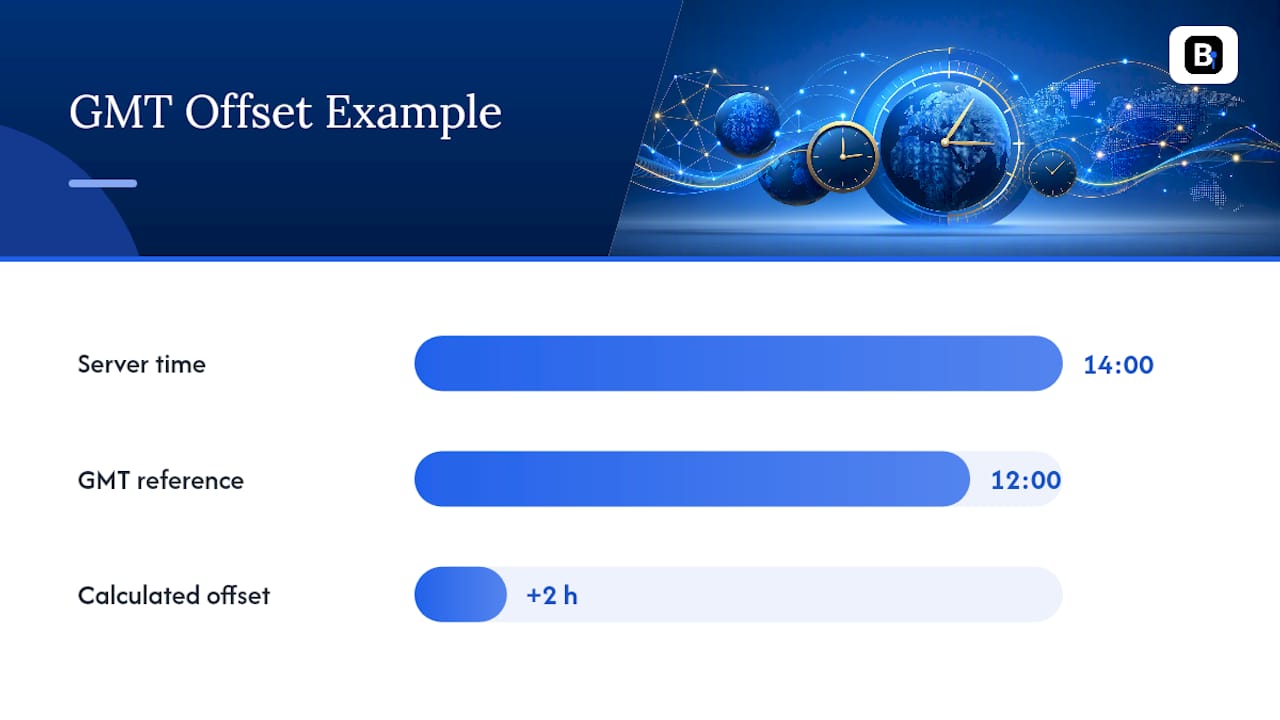
A quick numeric example: say TimeCurrent() returns a timestamp equivalent to 14:00 server time, and TimeGMT() returns 12:00 GMT for that same instant. The math gives you (14:00 - 12:00) = 2 hours. Your broker is running GMT+2 at that moment.
Here's a minimal verification block for OnInit():
- Declare
int offset = (int)((TimeCurrent() - TimeGMT()) / 3600); - Print it:
Print("Server GMT offset (hours): ", offset); - Compare the logged value against your broker's published server time zone.
- Re-run the check after any known DST switch to catch drift early.
The MT5 Way: SYMBOL_GMT_SHIFT and How to Handle Its Edge Cases
MT5 gives you a shortcut MT4 doesn't have. Call SymbolInfoInteger(Symbol(), SYMBOL_GMT_SHIFT) and you get the broker's server GMT shift in seconds, expressed as hours once divided by 3,600, straight from the terminal itself, per the detailed breakdown in this MQL5 article on detecting broker time zone and DST. No subtraction, no manual arithmetic, no ambiguity about which clock you're reading.
- Read it once in
OnInit()and cache the value; there's no need to call it on every tick. - A return value of
-1signals failure, usually because the symbol isn't fully initialized yet or the terminal hasn't synced with the trade server. - If you get
-1, retry after a short delay or fall back to the manualTimeCurrent()minusTimeGMT()calculation used in MT4.
This sidesteps a whole category of MQL4 headaches: no confusion between local and terminal time functions, no manual DST tracking in most cases, since the broker's own shift value already reflects any seasonal adjustment.
Daylight Saving Time and the EU/US Gap Weeks That Break Session Filters
Most forex brokers run a GMT offset that shifts seasonally in accordance with Eastern European DST conventions rather than your own country's clock. The friction shows up during the one to two week window each spring and fall when the European Union and United States switch their clocks on different dates. Your EA's assumed offset can be off by an hour for several trading days until both regions settle into their new schedule.
Hardcoded offsets fail here. An EA with int brokerOffset = 2; baked into the source code will misfire every session filter the moment the broker shifts to summer time and nobody recompiles.
- Dynamic detection (recalculating the offset at runtime) survives DST changes automatically but adds a small computation cost.
- Hardcoded values are faster and simpler, but only if you're willing to manually update and redeploy twice a year, which most traders forget to do.
- Community guidance consistently favors dynamic checks over static dates, since DST-aware EA design avoids the missed-transition failure mode entirely.
Pro Tip: Block your EA from opening new trades during the server's 00:00 rollover hour. Bar timestamps and spread behavior get erratic right at rollover, and that's also when a stale offset does the most damage.
Recheck the offset on a schedule, not just at startup, and run unit tests that specifically span both the March and November transition weeks before you trust an EA with real capital.
Converting GMT Session Hours to Server Time (With a Verification Checklist)
Once you have the broker offset, converting a GMT-anchored session start into server hours is one line: serverHour = (StartHourGMT + brokerOffset) % 24. The modulo operator handles wrap-around, so a session starting at 22:00 GMT on a broker running GMT+3 correctly lands at 01:00 server time instead of an invalid 25:00.
- Expose
StartHourGMTandEndHourGMTas EA inputs, anchored to GMT so the logic never changes across brokers. - Compute
serverHourat runtime using the current offset, never a value typed in once and forgotten. - Compare
TimeHour(TimeCurrent())against your computedserverHourinside the session filter, not against a hardcoded number. - Print both the GMT input and the computed server hour to the Experts log on every session change so you can audit behavior after the fact.
The most reliable pattern in production EAs is boring by design: anchor everything to GMT, convert to server time only at the point of comparison, and log every conversion. Boring code is auditable code, and auditable code is what survives a broker changing its DST policy without warning.
Before deploying, run the Strategy Tester across a date range that includes at least one DST transition week for both the EU and US. Compare the logged offset values against what you expect for winter and summer, and confirm the session filter fires at the correct server hour on both sides of the switch. If the Strategy Tester and live logs disagree, trust the live Experts log since backtest time handling can behave differently from a live connection.
Common Mistakes That Break Time-Based EAs (and Quick Fixes)
Most timing bugs trace back to the same handful of causes.
- Using
TimeLocal()orTimeGMTOffset()instead of the server-based formula. Fix: replace every instance withTimeCurrent()andTimeGMT(), per the MQL4 reference. - VPS clock drift from a misconfigured NTP source. Fix: verify your VPS system clock against a trusted time server; a drifting host clock won't affect
TimeCurrent()directly but can mask other sync issues in logging. - Hardcoded offsets left over from testing. Fix: switch to the dynamic formula or
SYMBOL_GMT_SHIFT, and delete the magic number entirely. - Never rechecking after a broker migration or DST switch. Fix: add a periodic offset print in
OnTimer(), not justOnInit().
After any fix, rerun the one-line print check from the top of this article and cross-reference the result with your broker's stated server time zone.
Why Precise Offsets Matter for Reliable Backtests
A one-hour offset error silently shifts every session boundary in a backtest, which corrupts win-rate and drawdown statistics without throwing a single error.
- Misaligned timestamps make a strategy look profitable or unprofitable for the wrong reasons entirely.
- Backtestmarket supplies clean, minute-bar historical datasets built for direct import into MT4 and MT5, so the timestamp alignment issue starts on solid footing.
- The import guide for MetaTrader walks through matching historical data to your broker's server time before you run a single test.
A Workflow Worth Adopting Before Your Next Live Deployment
Print the offset in OnInit(), verify it against your broker's stated time zone, then rerun that same check after every DST transition and every broker server migration. It takes ninety seconds and catches the exact class of bug that turns a solid strategy into a string of mistimed entries. Reproducibility starts with trusting your own logs more than your assumptions.
Get Import-Ready Data That Already Matches Your Broker's Clock
Getting the offset right is only half the job. The other half is trusting the historical data you're testing against, and that's where a lot of DIY data pipelines fall apart. Backtestmarket sells clean, minute-bar historical datasets across forex, metals, indices, and bonds, built specifically for direct import into MT4 and MT5, so you're not reconciling three different time sources before you can even run a test.
Every dataset comes with a documented import process for MetaTrader, and if you're testing a major pair like EUR/USD, the EUR/USD historical data set is ready to load without reformatting a single column. If a third-party connector fits your workflow better, Tickerly's MetaTrader connection tools are worth a look for syncing external data pipelines. Real engineers answer support questions directly, not a ticket queue. Browse the forex historical data catalog and pull a dataset that matches your broker's actual server hours before your next backtest run.
Docs and Guides Worth Bookmarking
For the underlying mechanics, the MQL4 TimeGMTOffset reference, the MQL4 Book's date and time functions, and the MQL5 article on broker timezone detection cover the official function behavior in full. For applying it to real datasets, Backtestmarket's MetaTrader import guide and blog walk through practical setup steps.
Frequently Asked Questions
What is the correct MT4 GMT offset formula for an EA?
Use (TimeCurrent() - TimeGMT()) / 3600. This gives you the broker server's offset from GMT in hours, which is what session filters and order timers should be built around.
Why does TimeGMTOffset() give me the wrong value?
Because it measures the difference between GMT and your local computer's clock, not the broker's server. Two machines running the same EA in different time zones will get different results from that function.
Does MT5 handle GMT offset differently than MT4?
Yes. MT5 exposes SymbolInfoInteger(Symbol(), SYMBOL_GMT_SHIFT), which returns the broker's shift directly without manual subtraction, though you still need to handle a -1 return value defensively.
How do I account for Daylight Saving Time in an EA?
Recalculate the offset dynamically at runtime rather than hardcoding a number, and specifically test your logic across the EU and US DST transition weeks, since brokers commonly shift between GMT+2 and GMT+3 seasonally.
How can I verify my offset calculation is correct?
Print the computed value to the Experts log using Print() inside OnInit(), then compare it against the time zone your broker states in its official FAQ or account documentation.
Sources
- TimeGMTOffset - Date and Time
- Date and time functions (MQL4 Book)
- Monochronic Trading (Part 1): How to Detect Broker Timezone and DST in MQL5 - MQL5 Articles
Recommended
- Blog | BacktestMarket | BacktestMarket
- Anomalies EAs — BacktestMarket | BacktestMarket
- Main EA — BacktestMarket | BacktestMarket
Related resources
Explore BacktestMarket's Expert Advisor robots to put the ideas in this article into practice.