- What is a backtest
- The importance of backtesting to evaluate strategies
- How to backtest in Metatrader (MT4)
- Conclusions
What Is a Backtest
Traders keep adjusting their trading strategies every day by improving the way they buy or sell. They seek to improve their performances according to past experiences. Backtesting is something very similar. In fact, backtesting is a way to estimate the performance of a strategy as if it had been employed during a past period. This requires simulating past conditions with sufficient detail, thus having very detailed and high quality historical data for the financial instrument you want to run your strategy on. Backtesting provides information not available for models and strategies tested on synthetic data, so the first thing you need is backtest data before starting with backtesting.
Backtesting is a way to simulate strategies in the past and so providing the information of a working or not working strategy. Algotraders need to know how to backtest strategies, otherwise they could incur in overfitting or bad backtesting and get wrong results from their models. It is important to do backtesting the right way, so we will try to give some hints on how to backtest a trading strategy with the MQL4 Strategy Tester, the MetaTrader 4 backtesting tool. Backtesting has historically only been performed by large institutions and professional money managers due to the expense of obtaining and using detailed datasets. However, thanks to high quality data offered at a really affordable price and independent web-based backtesting platforms like MetaTrader 4, even retail traders can run backtests on a wider base.
The Importance of Backtesting to Evaluate Strategies
According to our experience, when trading according to a manual strategy, a trader sees just a limited set of scenarios showing information of a partial period in the current past. A trader should have so much time available to run his strategy before understanding all the possible scenarios of the market and evaluating its robustness. This is why backtesting is so important. All the past scenarios are available in one shot and the results are immediately evaluable with the result of the backtest.
Since the backtest shows all the scenarios, it is possible to optimise the strategy just by analysing the results. Algotraders fine tune variables of their algorithms in order to optimise performances and run backtests again with improved variable values to obtain better performances.
A backtest creates even comparable data that will let you analyse the results of your real trading performances against those of the backtest. In short, by backtesting a trading strategy you create a benchmark that will help you analysing future performances in real trading.
Just to sum up, backtests tell you:
- How your strategy behaved in the past
- How you can optimise the trading strategy behind the algorithm in order to improve performances
- What is the benchmark for your real trading performances when your algorithm will run for real in the market
How to Backtest in Metatrader (MT4)
Many traders are asking us how to start with backtesting. That's why we decided to write a quick guide to help you get started, explaining how to backtest an Expert Advisor in MetaTrader 4 through a quick how-to on using the Strategy Tester feature of MT4.
First of all you need an Expert Advisor. You can learn how to code them, or just buy one from a trusted provider.
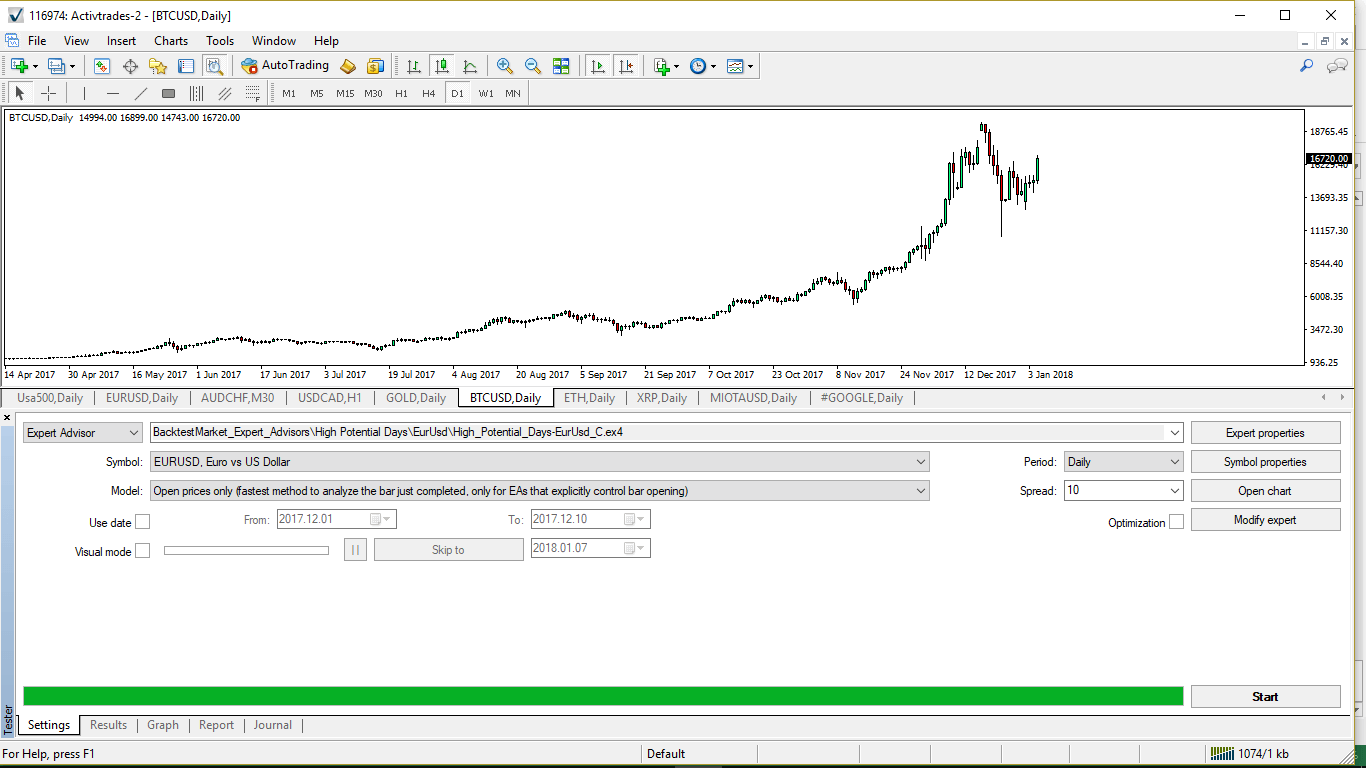
Once you have your Expert Advisor ready, open the Strategy Tester panel by clicking on View and then selecting Strategy Tester as shown in the following image.
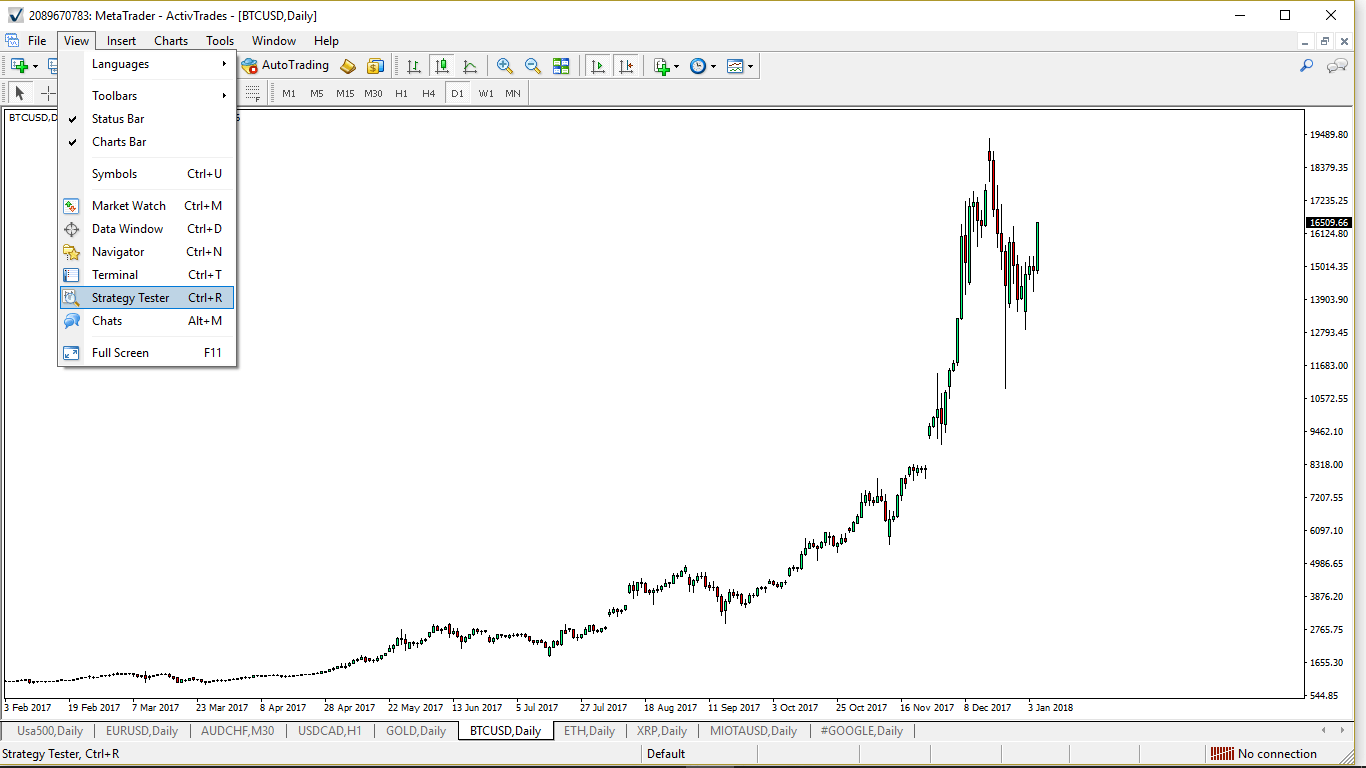
A panel appears on the bottom of the MetaTrader platform.
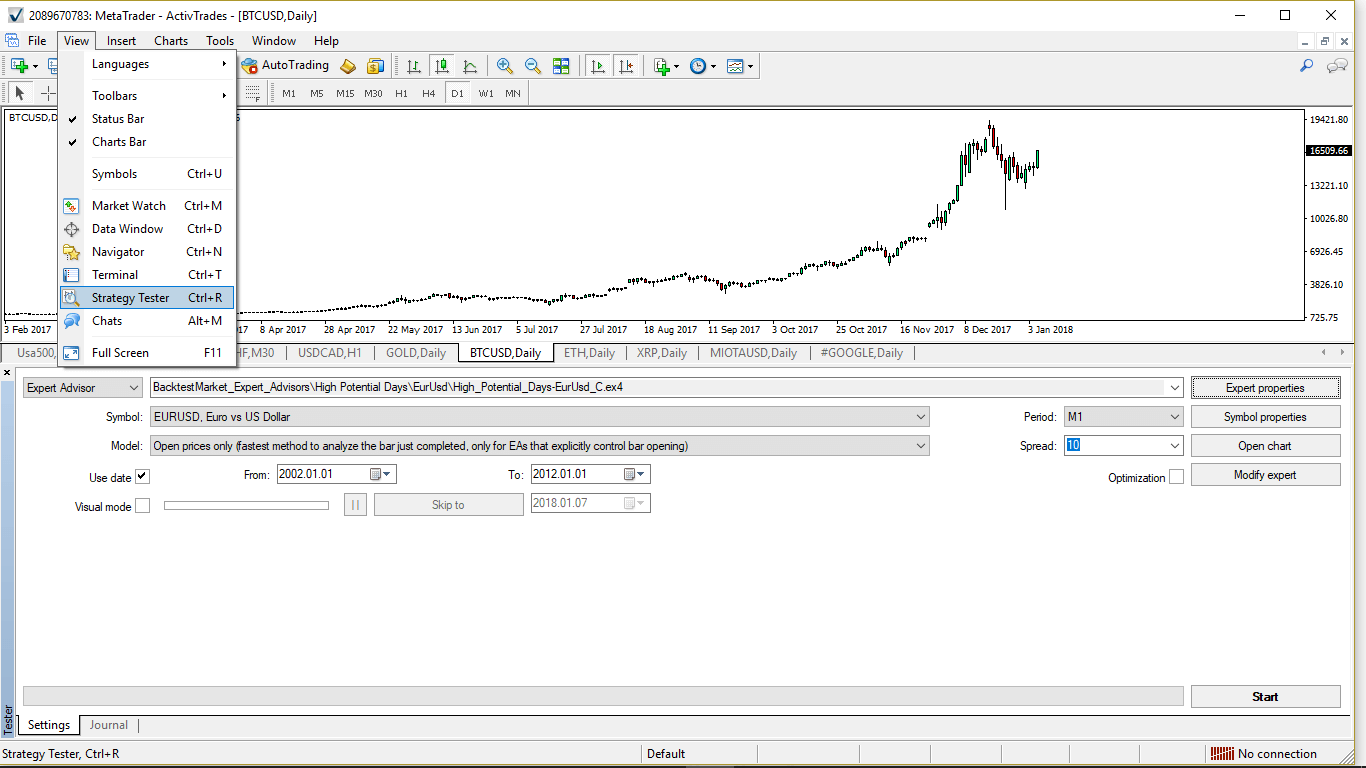
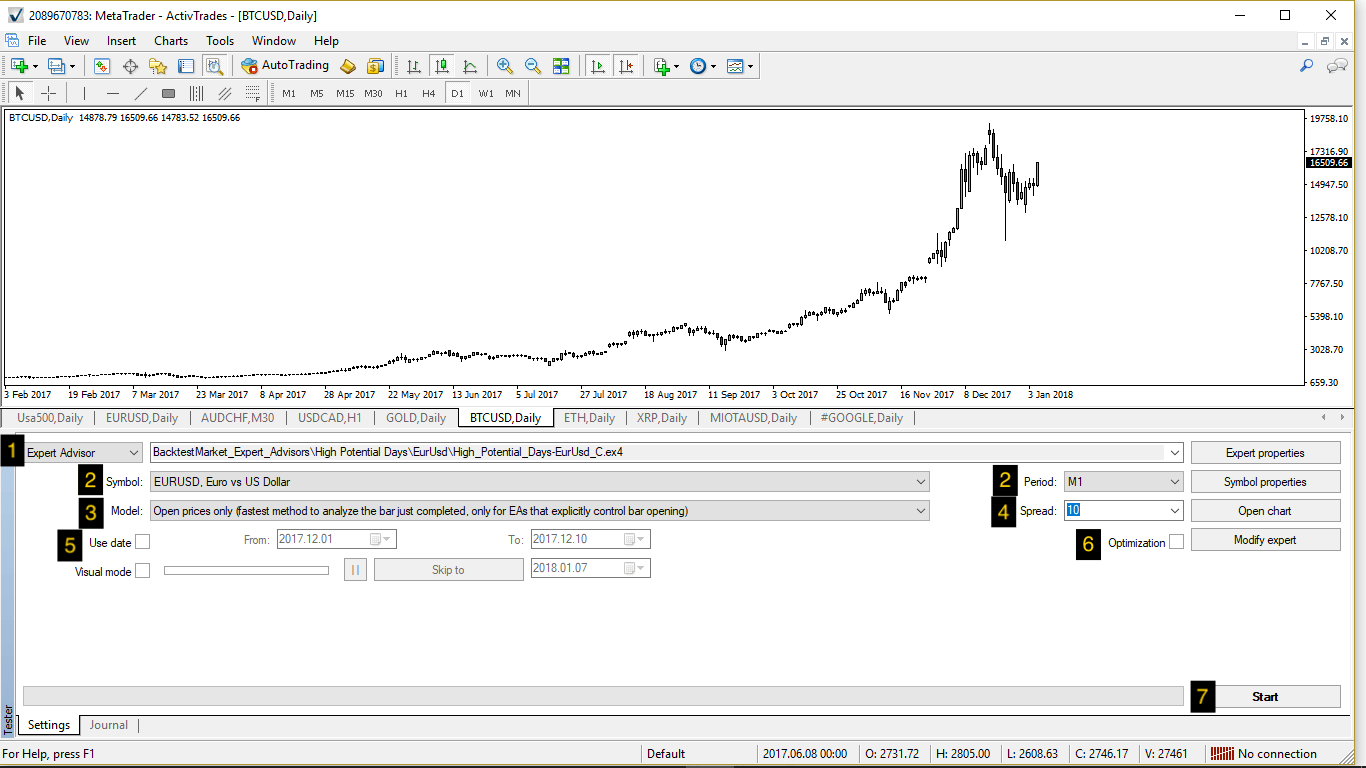
Now you just need to follow these 7 steps:
-
Pick the Expert Advisor you chose from the list in the field called "Expert Advisor:"
-
Select the financial symbol from the "Symbol" field and the timeframe you wish to backtest your strategy with from the field called "Period"
Warning: remember to load historical data for the symbol you chose before going ahead. Please read our guide on how to load data in MetaTrader if you do not know how to do it.
-
Choose the Model value. There are three possibilities according to your needs:
- "Every tick" lets you have a more precise backtest, but it is really slow because MetaTrader reads Open, High, Low, Close prices from the historical dataset and generates random prices inside each candlestick, from the opening price to the closing one
- "Open Prices Only" is a good parameter to run backtests if your strategy is a medium-term one, you do not care about movements inside the single candlestick and you do not need to read High and Low prices. It is a much faster method and a good compromise if you need to run multiple tests for optimisation
- "Control Points" is a less reliable method because it is based on the nearest lower timeframe — we suggest not to use it
-
Select the "Spread" according to your broker fees. Our suggestion is to always backtest with spreads two times bigger than the ones you really pay to your broker. It is always better to backtest in a worst case scenario. If you do not know this information, just select "Current" from the Spread field
-
Do not tick the field "Use date" — it is just a way to reduce your backtesting date range, and will be useful for optimisations to run walk-forward analysis and to avoid overfitting
-
Do not tick the "Optimization" button because you are running the backtest for the first time. You need to optimise the strategy later, in a second step
-
Click the "Start" button and run your backtest
In this example we are running the backtest for the Expert Advisor called "High Potential Days" using EUR/USD 1-minute timeframe for the full history loaded in the History Center.
Remember that as a golden rule, the higher the data quality the more accurate the backtest. We suggest using 1-minute high quality data.
In a short time a graph called the equity line should appear in the "Graph" section. In the "Result" section you have all the parameters and past performances of your strategy, as shown by the following images.
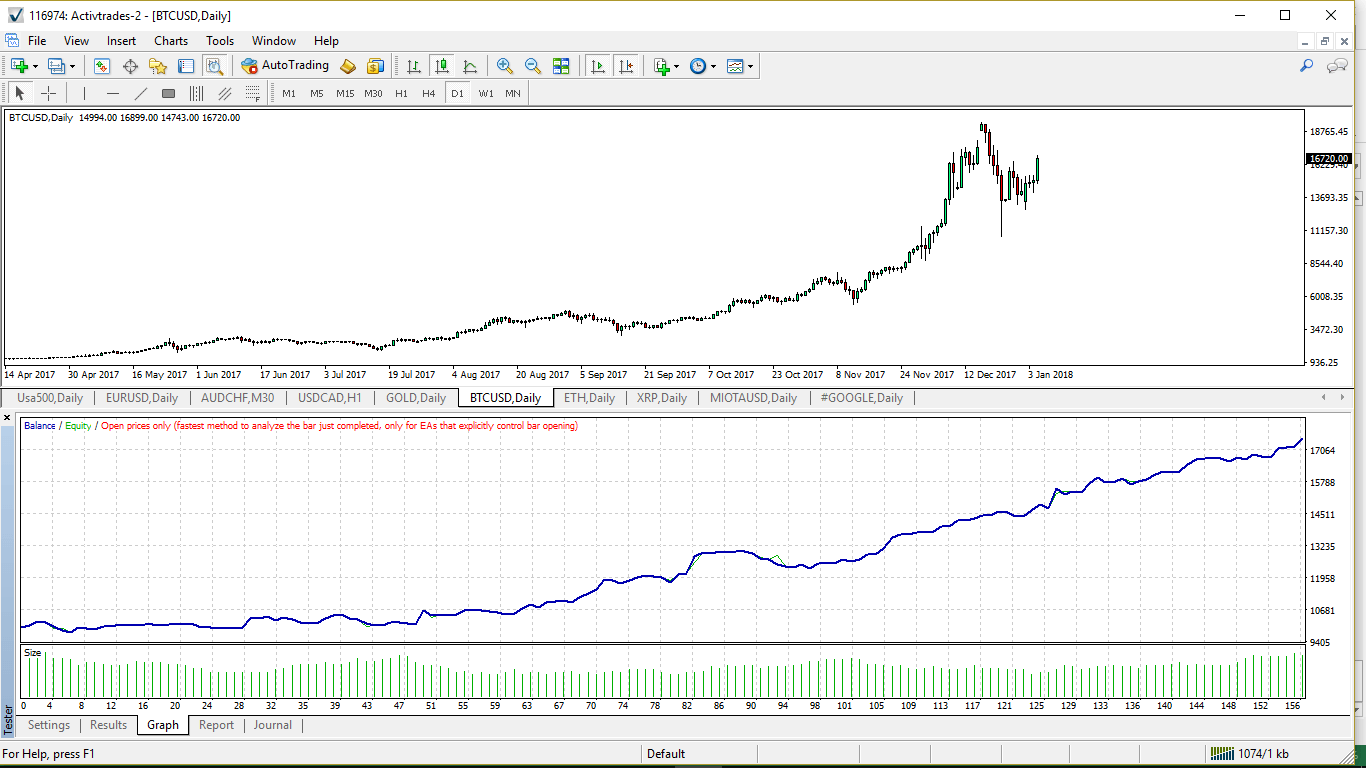
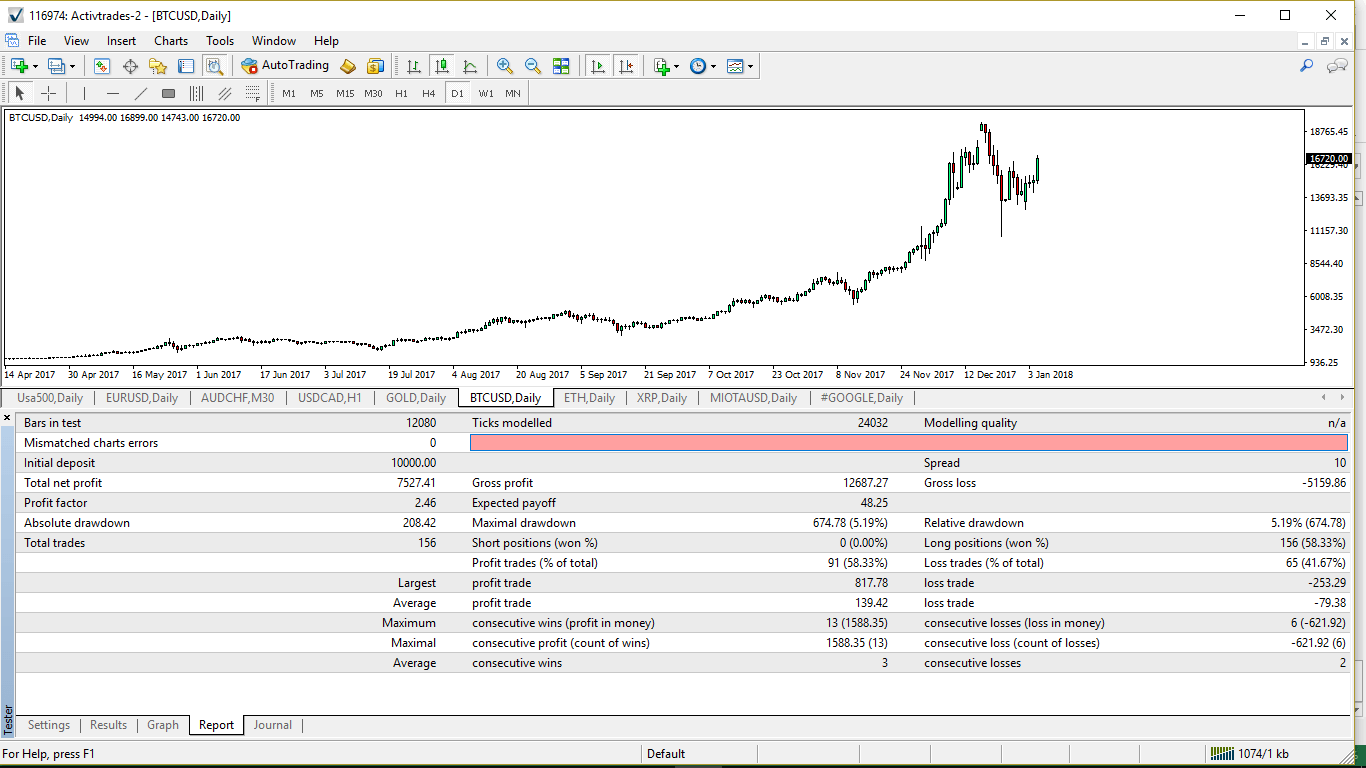
The main parameters to be taken into account to evaluate a strategy are explained in our reading a backtest report guide.
Conclusions
I hope this quick tutorial makes Expert Advisors a little less intimidating for newcomers! If you have any questions, feel free to get in touch.
Knowing how to backtest a strategy is just the beginning of the path. Now you need to know how to optimise strategies with MetaTrader 4 and how to deal with real trading — stay tuned.