In this lesson you will write a complete Expert Advisor whose logic is: buy when a fast Moving Average crosses above a slow one, sell when it crosses below. This is one of the classic systematic strategies — simple enough to code in a single session, yet a real working EA you can backtest.
Step 1: Variables Declaration
The first thing every EA needs is a set of variables. Variables in MQL4 can be global (declared before OnInit(), accessible from any function) or local (declared inside a function, only usable within it).
For a crossover EA, declare these five integer variables globally at the top of your file:
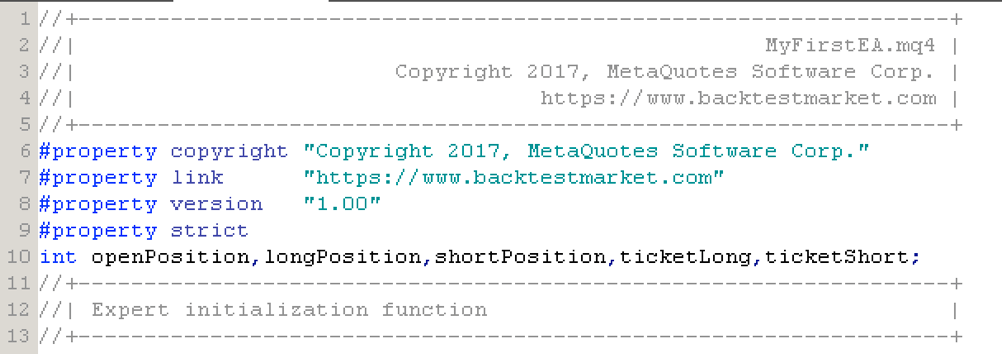
openPosition— tracks whether a position is currently open (1) or not (0)longPosition— flags that we are currently longshortPosition— flags that we are currently shortticketLong— stores the order ticket number for the open long positionticketShort— stores the order ticket number for the open short position
Always end each variable declaration line with a semicolon — missing semicolons are the most common cause of compilation errors.
Step 2: OnInit Function
Inside OnInit(), assign default values to the three state variables. This ensures the EA starts with a clean slate every time it is attached to a chart:
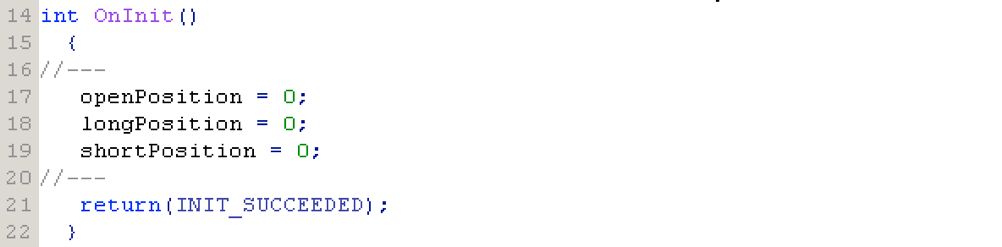
Setting openPosition, longPosition, and shortPosition to 0 at init means the EA correctly recognises that no position is open when it first loads.
Step 3: OnTick Function
This is where the trading logic lives. Inside OnTick(), first declare four local Moving Average variables:
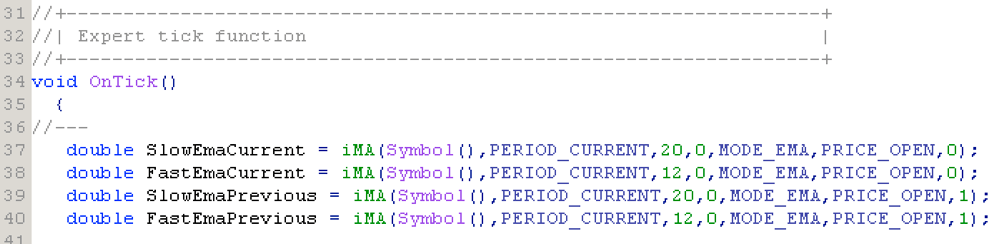
Why four MAs? A crossover signal requires comparing the current bar's fast/slow MA values against the previous bar's values. You need both time steps to detect when the lines crossed:
fastMACurrent— fast MA on the current (forming) barfastMAPrevious— fast MA on the bar just beforeslowMACurrent— slow MA on the current barslowMAPrevious— slow MA on the bar just before
Step 4: Entry and Exit Conditions with if Statements
With the four MA values calculated, write the entry conditions using if statements:
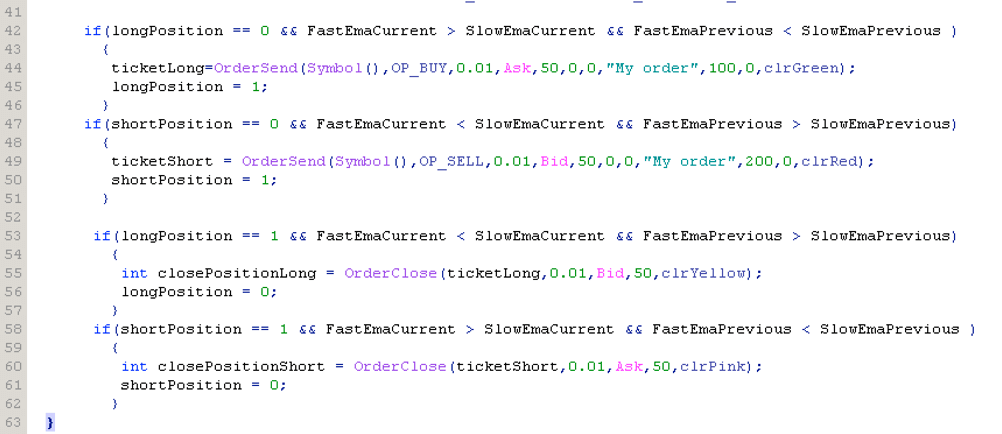
The logic in plain English:
Long entry: If no position is open AND the fast MA was below the slow MA last bar AND the fast MA is now above the slow MA → the lines just crossed upward → call OrderSend() with OP_BUY, set longPosition = 1, openPosition = 1.
Short entry: If no position is open AND the fast MA was above the slow MA last bar AND the fast MA is now below the slow MA → lines crossed downward → call OrderSend() with OP_SELL, set shortPosition = 1, openPosition = 1.
Long exit: If longPosition == 1 AND the fast MA has crossed back below the slow MA → close the long order using OrderClose() with the stored ticketLong, reset state variables to 0.
Short exit: If shortPosition == 1 AND the fast MA has crossed back above the slow MA → close the short order using ticketShort, reset state.
Conclusions
You have now built a complete Expert Advisor from scratch. It declares global variables, initialises them in OnInit(), reads Moving Averages on every tick in OnTick(), and uses if statements to enter and exit trades on crossover signals.
From here the next step is backtesting — load historical data for a symbol and run this EA through the MetaTrader Strategy Tester to see how it would have performed. Read the How to Backtest an Expert Advisor in MetaTrader 4 guide to get started.
The MQL4 programming series continues with a deep-dive video course covering variables, arrays, operators, and more — see Learn MQL4 Programming.