

To resample minute data, call df.resample(rule).agg(OHLCV_AGG) with open=first, high=max, low=min, close=last and volume=sum. Localize timestamps to the exchange timezone first, then anchor buckets with origin or offset so 5-minute bars start where charts expect them. Count the source rows in each bucket and drop or flag the thin ones, rather than blindly forward-filling OHLC prices.
TL;DR:
- Use first open, maximum high, minimum low, last close, and summed volume; drop empty buckets because they contain no genuine closing price.
- Convert timestamps to the exchange timezone before resampling, then set origin or offset to align buckets with the session’s chart grid.
- Count source rows per bucket and flag incomplete bars; drop them for backtests, but retain them with an is_partial flag for charts or model inputs.
- When gaps must be filled, seed Open from the prior Close, set missing Volume to zero, and rebuild High and Low from Open and Close.
- Set closed and label explicitly: open stamped minutes usually use left edges, while close stamped minutes usually use right edges; signals should use completed bars only.
Table of Contents
- Copy-paste pandas recipe for resampling minute OHLCV data
- How to align buckets: origin, offset, modulo snap, and timezones
- Detecting and handling missing minutes with bar_count
- Filling strategies that keep OHLC candles logical
- How label and closed change bucket contents
- Pre-flight checklist before you backtest resampled bars
- End-to-end example: 1min to 5min, 15min and 1h with partial handling
- Why we keep raw minutes and resample later
- Ready-to-import minute bars from BacktestMarket
- FAQ
- Sources
Copy-paste pandas recipe for resampling minute OHLCV data
The pandas resample method needs a DatetimeIndex, or an on column that holds timestamps. Define the aggregation map once and reuse it for every target frequency:
import pandas as pd

OHLCV_AGG = {
    "open": "first",
    "high": "max",
    "low": "min",
    "close": "last",
    "volume": "sum",
}

bars_5m = df.resample("5min").agg(OHLCV_AGG)
bars_5m = bars_5m.dropna(subset=["close"])
Follow this pattern every time:
- Make sure the index is a sorted DatetimeIndex, or plan to pass
on="timestamp". - Apply
.resample(rule).agg(OHLCV_AGG)with the same map for each frequency. - Drop empty windows with
dropna(subset=["close"]), because a bucket with no trades has no close. - Add a quality column such as
bar_countbefore you trust the result (more on that below).
If timestamps live in a column, the call changes only slightly:
bars_5m = df.resample("5min", on="timestamp").agg(OHLCV_AGG)
This works, but it is slower and easier to get wrong than the index version. When you load data, run df = df.set_index("timestamp").sort_index() once, then resample from the index everywhere after that.
Pro Tip: Keep column names lowercase and consistent across your whole pipeline, so one OHLCV_AGG dict serves every dataset and every frequency.
How to align buckets: origin, offset, modulo snap, and timezones
Resampling is really realignment. If your 5-minute buckets drift off the 09:30, 09:35, 09:40 grid, the bars no longer match any chart you compare against. The resample documentation describes origin and offset as the controls for bin alignment, and the time series user guide shows origin='start' and origin='end' changing where the grid begins.
origin="start_day"(the default) anchors the grid at midnight of the first day, which suits most intraday work.origin="start"anchors at the first timestamp, so a data set that begins at 09:31 gets buckets starting at 09:31.origin="end"or"end_day"anchors to the last timestamp or the last midnight, useful when you build bars backward from the most recent data.- An offset shifts every boundary, handy when a session opens off the hour and you want hourly bars aligned to that session.
For epoch-stamped data, a modulo snap gives you a grid that does not depend on any origin logic:
step = 300  # seconds in a 5-minute bar
df["bucket"] = (df["epoch"] // step) * step
bars = df.groupby("bucket").agg(OHLCV_AGG)
bars.index = pd.to_datetime(bars.index, unit="s", utc=True)
Timezones matter just as much. Localize to the exchange timezone before resampling, for example df.index.tz_localize("UTC").tz_convert("America/New_York"). A guide on handling time zones warns that skipping this step causes session drift and misaligned daily boundaries. Our own write-up on fixing DST errors in minute data shows how the problem surfaces in practice.
The rule of thumb: localize first, resample second, and never the other way around.
Detecting and handling missing minutes with bar_count
Minute data has gaps, and not all of them are errors. Thin instruments often lack bars for quiet minutes, and the pandas resampling reference is a good place to start when you need to inspect how buckets form. If you forward-fill missing minutes, you create flat synthetic periods that can mislead indicators. The safer habit is to measure how complete each bucket is.
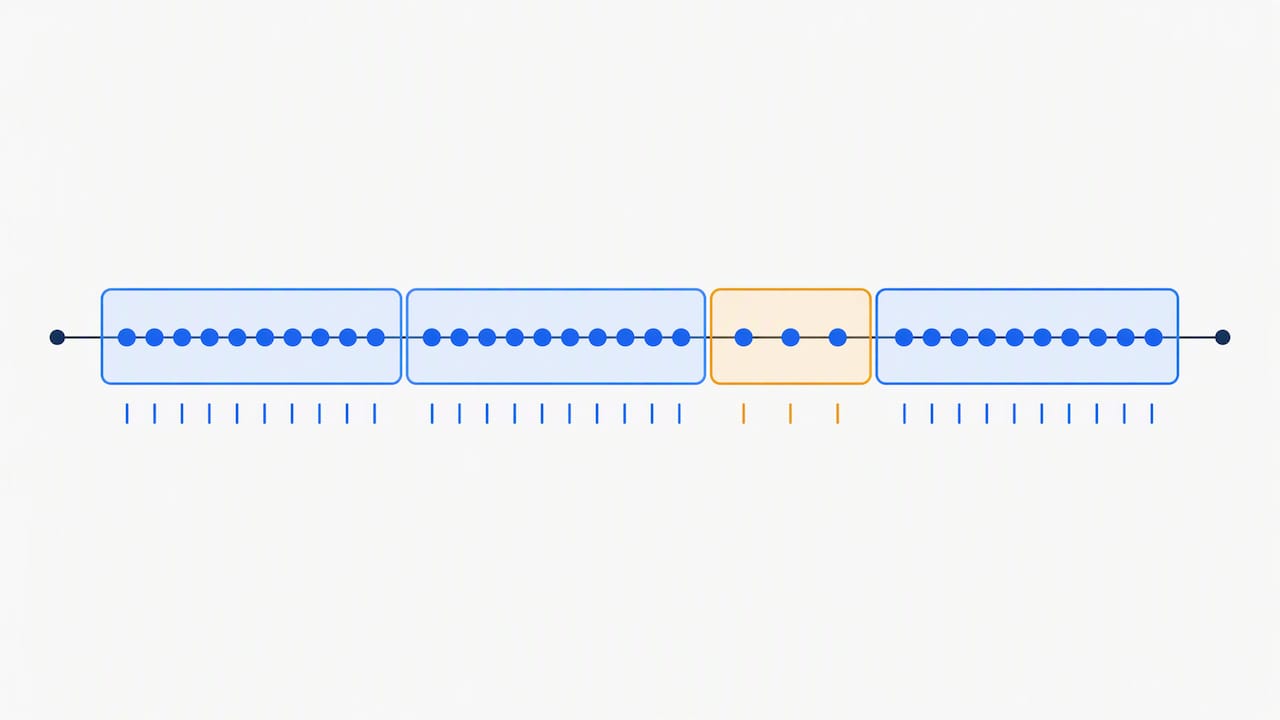
freq = interval
res = df.resample(freq).agg(OHLCV_AGG)
res["bar_count"] = df["close"].resample(freq).count()

expected = expected_count
res["is_partial"] = res["bar_count"] < expected * threshold
Here is the workflow we recommend:
- Compute
bar_countwithdf["close"].resample(freq).count(). - Work out the expected count per bucket, which is the bucket length in minutes for a continuous market and the session-adjusted number near opens and closes.
- Flag buckets that fall below a chosen threshold of the expected count.
- Decide per use case whether to drop or keep the flagged bars.
The tradeoff is simple. For backtests, consider dropping partial bars, because a bar built from only part of its expected interval can look calmer than the market really was. For charting or certain machine learning inputs, keep the bar and carry the is_partial flag as a feature so the model or the reader knows how much to trust it.
Pro Tip: Report mismatches per session, not just per bucket. A whole session with noticeably fewer bars than its neighbors may point to a feed or timezone problem, not a quiet market.
Our audit for handling missing bars walks through the same idea from the data-quality side.
Filling strategies that keep OHLC candles logical
Sometimes you must fill, for a live chart or a model that cannot accept gaps. Do it per column, never with one blanket call. A reference on asfreq notes that naive forward or backward fill produces illogical High and Low values, and recommends rebuilding them after the fact.
- Seed a missing Open from the previous Close, since the first trade of a new bar usually opens near where the last one ended.
- Fill a missing Close from the next Open where the next bar exists.
- Forward-fill volume only if you want zeros handled explicitly. Most analysts set missing volume to 0 instead.
- Rebuild High as
max(Open, Close)and Low asmin(Open, Close)for buckets with no tick detail.
filled = res.copy()
filled["open"] = filled["open"].fillna(filled["close"].shift())
filled["close"] = filled["close"].fillna(filled["open"].shift(-1))
filled["high"] = filled["high"].fillna(filled[["open", "close"]].max(axis=1))
filled["low"] = filled["low"].fillna(filled[["open", "close"]].min(axis=1))
filled["volume"] = filled["volume"].fillna(0)
Interpolating High and Low is unsafe because it can place a High below the Open or a Low above the Close, which no real candle can show. For more on how different bar-building choices change what a backtest sees, read our piece on bar aggregation methods.
How label and closed change bucket contents
Two parameters decide what each bucket contains and what it is called. The time series guide demonstrates both with examples like ts.resample('2h').mean().
closed="left"includes the left edge of the interval and excludes the right, so a 09:35:00 row belongs to the 09:35 bucket.closed="right"flips that, and the 09:35:00 row lands in the bucket that ends at 09:35.label="left"stamps the result with the start of the interval.label="right"stamps it with the end, so a 09:30 to 09:35 bar is labeled 09:35.- A row that sits exactly on a boundary is the case where these settings change your numbers, not just your labels, because the row moves into a different bucket and shifts the open, close and volume.
- If your minute bars are stamped at open, use
closed="left", label="left". If they are stamped at close,closed="right", label="right"usually matches the data's meaning.
Set both explicitly in research code instead of trusting defaults, and write a one-line comment saying which stamp convention your source uses. Future you will be grateful.
Pre-flight checklist before you backtest resampled bars
Run these checks before resampled bars enter any research or live system:
- Verify expected minute counts per session and report mismatches.
- Confirm timezone and DST handling, and inspect the first and last partial bars of each day.
- Check
bar_count, then drop or flag low-count bars. - Avoid blind forward-fill of OHLC.
- Use only completed bars for signals, shifting by one bar where needed so a signal never sees a bar that has not closed.
| Check | Action when it fails |
|---|---|
| Minute count per session | Investigate the feed or timezone before resampling |
| Partial first or last bar | Drop it or flag it with is_partial |
Low bar_count | Drop for backtests, keep and flag for charts |
| Filled OHLC | Rebuild High and Low from Open and Close |
| Signal timing | Shift so signals use completed bars only |
Our spike test for intraday data cleaning pairs well with this list, because bad ticks distort aggregated highs and lows.
End-to-end example: 1min to 5min, 15min and 1h with partial handling
Here is one runnable pattern that combines everything above:
frames = {}
for rule, n in {"5min": 5, "15min": 15, "1h": 60}.items():
    out = df.resample(rule).agg(OHLCV_AGG)
    out["bar_count"] = df["close"].resample(rule).count()
    out["is_partial"] = out["bar_count"] < n * 0.8
    frames[rule] = out[~out["is_partial"]].dropna(subset=["close"])
Walk through it in this order:
- Start from a minute DataFrame with a sorted, localized DatetimeIndex.
- Resample to the desired frequencies with the same
OHLCV_AGG. - Compute
bar_count, setis_partialusing a chosen threshold, and drop flagged bars. - Verify: compare total volume before and after (they should match apart from dropped bars), then pick a few buckets and recompute open, high, low and close from the raw rows by hand.
Pro Tip: Spot-check the first bar of the day and the bar after any known gap. Those are where alignment bugs hide.
Why we keep raw minutes and resample later
Our view is that you should store minute data even if your strategy trades hourly bars. Minute data is essential for microstructure and slippage modeling, and keeping it means you can re-resample with a corrected alignment when you discover a timezone or origin mistake. The cost is storage and IO, which is small next to the cost of a backtest built on bars you cannot rebuild. Coarser bars are fine for higher-level strategies, but derive them from a verified minute source, not the other way around. Clean sources also cut the surprises from missing bars and inconsistent timestamps that make every downstream check harder.
— Start
Ready-to-import minute bars from BacktestMarket
If you would rather start from verified bars than audit your own, we offer cleaned minute-bar intraday data sets ready for MT4 and MT5 import. Each bar is verified. Browse our Historical Data or see the Annual Plan, listed at 119 EUR per year.
FAQ
What is the right way to resample minute data to 5-minute bars?
Use df.resample("5min").agg(OHLCV_AGG) with open as first, high as max, low as min, close as last and volume as sum. Then drop empty buckets with dropna(subset=["close"]). The pandas documentation lists this aggregation style for OHLCV data.
Should I forward-fill missing minutes before resampling?
Usually not for backtests. Forward-filling creates flat synthetic bars that can make a market look calmer than it was. Count the real rows per bucket and drop or flag the sparse ones instead.
How do I make resampled bars start on session boundaries?
Localize to the exchange timezone, then set origin or offset so the grid starts at the session open. For epoch data, a modulo snap on the timestamp gives the same fixed grid without relying on origin.
What does label="right" do in resample?
It stamps each bar with the end of its interval instead of the start. Combine it with closed="right" when your minute bars are stamped at close, so boundary rows land in the bucket they belong to.
Recommended
- Four Forex Minute Data Sources for Quants Ready for MT4/MT5
- Quants: Intraday Data Cleaning With a Three Condition Spike Test
- Stop False Backtests: 3 QA Checks for MT4/MT5 Import Ready Datasets
- Six Bar Aggregation Methods Quants Can Calibrate for ML Backtests
Related resources
Explore BacktestMarket's Expert Advisor robots to put the ideas in this article into practice.